嗯,用户让我用中文总结一下这篇文章的内容,控制在一百个字以内,而且不需要以“文章内容总结”或者“这篇文章”这样的开头。直接写文章描述即可。 首先,我需要通读整篇文章,理解其主要内容。这篇文章是关于网络威胁情报(CTI)面试指南的,分为三个主要部分:基础、框架和威胁分析。 在“基础”部分,作者解释了CTI的定义、数据与情报的区别、情报类型(战略、运营、战术)、IoC与IoA的区别以及TTPs和TLP协议。这些都是CTI的基本概念。 接下来是“框架”部分,介绍了情报周期、网络杀伤链、钻石模型和MITRE ATT&CK框架。这些框架帮助分析师理解和应对网络威胁。 最后是“威胁分析”部分,讨论了恶意软件分析方法(静态和动态)、工具如VirusTotal、MalwareBazaar、沙箱和YARA规则。还涉及了基于Web的威胁,如TLS和DNS协议,以及工具如Shodan、Censys、urlscan.io等。 此外,文章还提到了一些工具如MISP和CyberChef,并强调了编程技能的重要性。 用户的要求是总结在100字以内,所以需要提炼出关键点:CTI面试指南涵盖基础概念、分析框架和工具方法,并附带练习题帮助准备面试。 确保语言简洁明了,不使用复杂的术语,并且直接描述内容。 </think> 这篇文章提供了一份针对网络安全威胁情报(CTI)角色的面试指南,涵盖了基础知识(如数据与情报区别、威胁类型)、常用框架(如情报周期、网络杀伤链)以及威胁分析方法(如恶意软件静态/动态分析)。文章通过实例和工具介绍帮助读者理解核心概念,并附带练习题供备考使用。 2025-10-23 09:46:13 Author: andpalmier.com(查看原文) 阅读量:19 收藏
Introduction
I didn’t find any interview guide for Cyber Threat Intelligence (CTI) roles that satisfied me (I’m not interested in AI slop), so I decided to write one!
I figured writing this post might help me organize my ideas, and - hopefully - help others preparing for their interviews. The goal is to refresh some topics some of you probably already know, and collect useful links, in case you want to dig deeper into a specific subject.
There are 3 sections:
At the end of each section, you’ll find some interview questions to practice what we’ve revisited.
Be sure to tailor your review based on the job description: every role may have unique requirements, and some are likely not covered in this post.
Foundations
What is CTI?
I’ll steal the definition from the book “Intelligence-Driven Incident Response” by Rebekah Brown and Scott J. Roberts: “Threat intelligence is the analysis of adversaries - their capabilities, motivations, and goals. Cyber threat intelligence is the analysis of how adversaries use the cyber domain to accomplish their goals”.
This shows where CTI fits in the bigger picture; it’s part of a hierarchy that goes from general intelligence down to the cyber domain:
- the Intelligence domain
- Threat Intelligence
- Cyber Threat Intelligence
Data vs Intelligence
- Data are raw facts or observations, like the measure of the distance between two points.
- Intelligence is the product of collecting, processing, and analyzing data to answer questions and support decisions. Good intelligence should be relevant, accurate and timely.
Basically, data becomes intelligence only when enriched with appropriate context.
Types of intelligence
There are 3 main categories of intelligence:
- Strategic: high-level, less prone to perish, used to look at long-term trends and drive decisions and policies. In the context of CTI, it may be motivations of the threat actors.
- Operational: lower level than strategic intelligence, helps teams plan and decide where to focus their effort. In CTI, this can include information on campaigns, actor attribution and capabilities.
- Tactical: low-level, mostly obtained from technical sources, therefore can support incident response, but highly perishable. Examples in the Cyber Threat Intelligence domain are Indicators of Compromise (IoCs) and observables.
IoC vs IoA
- Indicators of Compromise: pieces of information which reveal that a system or a network has been compromised. Some examples may be IP addresses or domain names associated with a C2, or hashes of malicious files. IoCs are reactive indicators, as they are used to identify attacks that already happened.
- Indicators of Attack: flags indicating that a threat or attack is in progress: often related to threat actors’ behavior, like anomalies in traffic volume, or suspicious commands executed. IOAs are proactive indicators, because they are used to detect potential attacks in early stages.
Tactics, Techniques & Procedures
Tactics, Techniques and Procedures (often abbreviated TTPs) describe the behavior of threat actors. More specifically:
- Tactics: high-level information, describes how an attacker operates during the attack (examples: compromise targets, infrastructure reuse…)
- Techniques: medium-level information, describes “how” an attacker carries out a tactic (tools used, malware…)
- Procedures: low-level information, they describe the specific sequence of actions used by the adversary to carry out each step of the attack cycle.
N.B. One technique might fit into several tactics, and vice versa.
I’ll try to make it more practical with an example: an actor wants access to a company’s network, and sends a phishing email with a malicious attachment to employees.
- Tactic: initial access
- Technique: phishing (malicious attachment)
- Procedures: the actor crafts a convincing email, develops or selects a malicious attachment to establish a foothold, sends the email to targeted employees…
Traffic light protocol
The Traffic Light Protocol (TLP) was designed to support the process of information sharing. It uses five color labels to show how far you can share certain information:
- TLP:RED: not for disclosure, information shouldn’t be disclosed, it’s restricted to participants only.
- TLP:AMBER+STRICT: limited disclosure, information can be shared to participants’ organization only.
- TLP:AMBER: limited disclosure, information can be shared to participants’ organization and its clients.
- TLP:GREEN: limited disclosure, information can be shared only to member of the community.
- TLP:CLEAR: disclosure is not limited.
📝 Quiz time
- How are data and intelligence linked between each other?
- Which are the different types of threat intelligence?
- What is the difference between IoC and IoA?
- What is the difference between TLP:AMBER and TLP:AMBER+STRICT?
Frameworks
Intelligence Cycle
The Intelligence Cycle is a step-by-step approach to turn raw data into actionable insights. Here are the steps:
- Requirements: gather answers to questions like “what do stakeholders need to know?” and “which threats should we focus on?”
- Collection: once the requirements are defined, it’s time to gather data! Some sources can be OSINT, threat feeds, and dark web monitoring.
- Analysis: this step is where the raw data turns into something meaningful, like patterns, trends, and connections.
- Dissemination: Finally, the findings are condensed in a report that should be distributed to the relevant stakeholders.
Cyber kill chain
The Cyber Kill Chain breaks down the steps that threat actors usually take when running an attack. It can help identify potential attack vectors and develop strategies to prevent, detect and respond to threats. Its stages are:
- Targeting: attacker chooses the target.
- Reconnaissance: attacker collects information about the target. The attacker can gather information about technical aspects of systems (hard data), and information about organization (soft data). Gathering techniques include active methods (require direct interaction with the target) and passive methods (third-party services can be used to collect information).
- Weaponization: attacker finds one or more vulnerabilities, crafts an exploit, and combines it with a payload.
- Delivery: attacker delivers the malicious code or software to the target (by email, phishing, SQL injection, a pigeon?)
- Exploitation: attacker uses the vulnerability identified to get unauthorized access to the target’s system and gain control of code execution. From now, the attacker has control of at least one process in the system.
- Installation: attacker installs malware or other tools in the target’s system to get ongoing access and establish persistence.
- Command and Control: attacker creates a communication with the target’s system to issue commands and extract data.
- Action and Exfiltration: attacker takes planned actions, (such as stealing data or disrupting operations), and exfiltrate the data out of the target’s system.
Diamond model
The Diamond model is a framework to analyze network intrusion events. It works by breaking them down into 4 elements, and highlighting the relationships between them. I think of it as a way to simplify events by zooming into the 4 components of the model:
- Adversary: the actor who carried out the cyber event.
- Infrastructure: the systems where the actor performed the attack, such as C2 servers or compromised IoT devices.
- Victim: the target of the event, such as an individual, an organization, or an industry.
- Capability: tools and techniques the actor used to achieve their goal, such as a malware, exploits, social engineering techniques.
The Diamond model helps connecting the dots between these parts of an attack, for instance:
- If we know the infrastructure is a phishing domain, we may be able to link it to an adversary, maybe using whois information.
- If we understand the capability is a malware family, we could find reports of other where it’s been used, and link it them to the same adversary.
Here is an ASCII art representing the framework:
            Adversary
                /\
               /  \
              /    \
Infrastructure ----- Capability
              \    /
               \  /
                \/
              Victim
MITRE ATT&CK Framework
MITRE ATT&CK (Adversarial Tactics, Techniques, and Common Knowledge) is a (huge!) database of tactics and techniques (see TTPs) that actors use or have used in the real world.
Explaining the whole MITRE ATT&CK framework it’s out of scope for this blog post, but I wanted to keep a section about it to remember to take some time to play with it if you never used or if it has been a long time.
I’ll also leave here a great infographic about MITRE ATT&CK by Thomas Roccia:

📝 Quiz time!
- How can the intelligence cycle help a CTI team?
- What is the difference between weaponization and exploitation in the Cyber Kill Chain framework?
- Describe the 4 main components of the Diamond model.
- How would a CTI analyst use the MITRE ATT&CK Framework?
Analyzing threats
Malware
The term “malware” is used for various kinds of software designed to perform undesired actions on a computer system, network or data. Here are some malware’ categories:
- Ransomware: disables victim’s access to data (often encrypting it) until a ransom is paid
- Spyware: collects user’s activity information without their knowledge
- Adware: pushes unwanted advertisements to the user
- Trojan: disguises itself as another application
- Backdoor/RAT: gives threat actors remote access to the victim’s device
- Keylogger: monitors user’s keystrokes
- Dropper: transports and installs another malicious payload in the infected system
When analyzing suspicious files, there are two approaches:
- Static analysis: examine files without executing them, for example extracting technical indicators from the file (like suspicious strings), or using a disassembler.
- Dynamic analysis: executes the suspected file in a safe environment (see sandboxes), to watch it in action.
Typically, the best approach is to use a combination of both, to get a full picture of what the file is actually doing.
Finding malware
- VirusTotal: my go-to way to quickly check a file, find out some context around it, how it behaves, and related samples. One of the coolest feature is that it’s possible to write YARA rules to search VT’s database or to get a notification when a new file matching our rules is uploaded.
- MalwareBazaar: another platform dedicated to sharing malware samples, but completely free! MalwareBazaar focuses only on malware samples: so no Adware, no benign files, and no suspicious domains.
- Malpedia: the encyclopedia of malware families. Unlike VirusTotal and MalwareBazaar, Malpedia is less about raw samples sharing, and more about context and classification: it works best for quickly looking up a malware family, find reports about it, and check if there are public YARA rules to track it.
Sandboxes
Sandboxes let an analyst safely run suspicious files or URLs in a controlled environment to observe their behavior. They’re particularly useful to understand what a malware sample does, which files it drops, and which network connections it attempts.
The DIY approach to sandboxes is to build a malware analysis lab using something like FLARE-VM. But in case you don’t want to go through all of that, you can choose from some available online sandboxes like: Any.Run, Hybrid Analysis, or Joe Sandbox. Each of those have different features (some free, some paid), but the idea is the same: run the sample in a safe place, and watch what happens.
YARA
From the project home page: “YARA is is a tool aimed at (but not limited to) helping malware researchers to identify and classify malware samples”. With YARA rules, you can describe text or binary patterns and use them to scan files, which is critical for hunting malware families in a large database of samples.
Here is an example of a YARA rule, and an explanation of some of its elements:
// YARA allows to import modules to extend its functionalities,
// some popular modules are: pe, cuckoo, hash
import "pe"

// The rule name identifies the YARA rule, use a meaningful
// name (not like the example below!)
rule DetectSuspiciousPE {

  // The metadata section allows to specify information about
  // the rule, such as author, date or sample used for the rule
  meta:
    author = "Andrea Palmieri"
    description = "Detects suspicious PE files with magic!"

  // The strings fields is used to define what the rule should
  // match; you can use text, hexadecimals and regex
  strings:

    // Simple text string that could appear in malware
    // nocase = case insensitive, fullword = non alphanumeric
    // wide = 2 bytes per character, base64 = base64 encoding
    $text_string = "malicious" nocase wide

    // Hex pattern for the suspicious API LoadLibraryA
    // Wildcards = { 4C ?F 6? }, Alternatives { 4C (6F|69) }
    // Jump = { 72 [2-4] 79 }
    $hex_string = { 4C 6F 61 64 4C 69 62 72 61 72 79 41 }

    // Regex to catch suspicious command-line flags
    $regex = /--inject|--persist/i

  // The condition defines when the rule should trigger
  condition:

    // Check if the file starts with the PE magic number "MZ"
    uint16(0) == 0x5A4D
    // Ensure it's actually a valid PE file using the PE module
    and pe.is_pe
    // And at least one of our suspicious indicators is present
    and any of them
}
And here is how to run a rule on files in the current folder:
Building YARA rules required balance: if they are too specific, they can miss variations of the same malware; if they are too broad, they will match a lot of false positives. A good rule should capture the malware’s unique “fingerprint” without being too restrictive.
📝 Quiz time!
- Assume you receive a malicious hash, how would you investigate it?
- What is the main purpose of a sandbox, and when would you use one?
- How do YARA rules help in identifying malware families? What makes a “good” rule?
Web-based threats
Before discussing web-based threats, it may be useful to briefly revisit 2 important protocols:
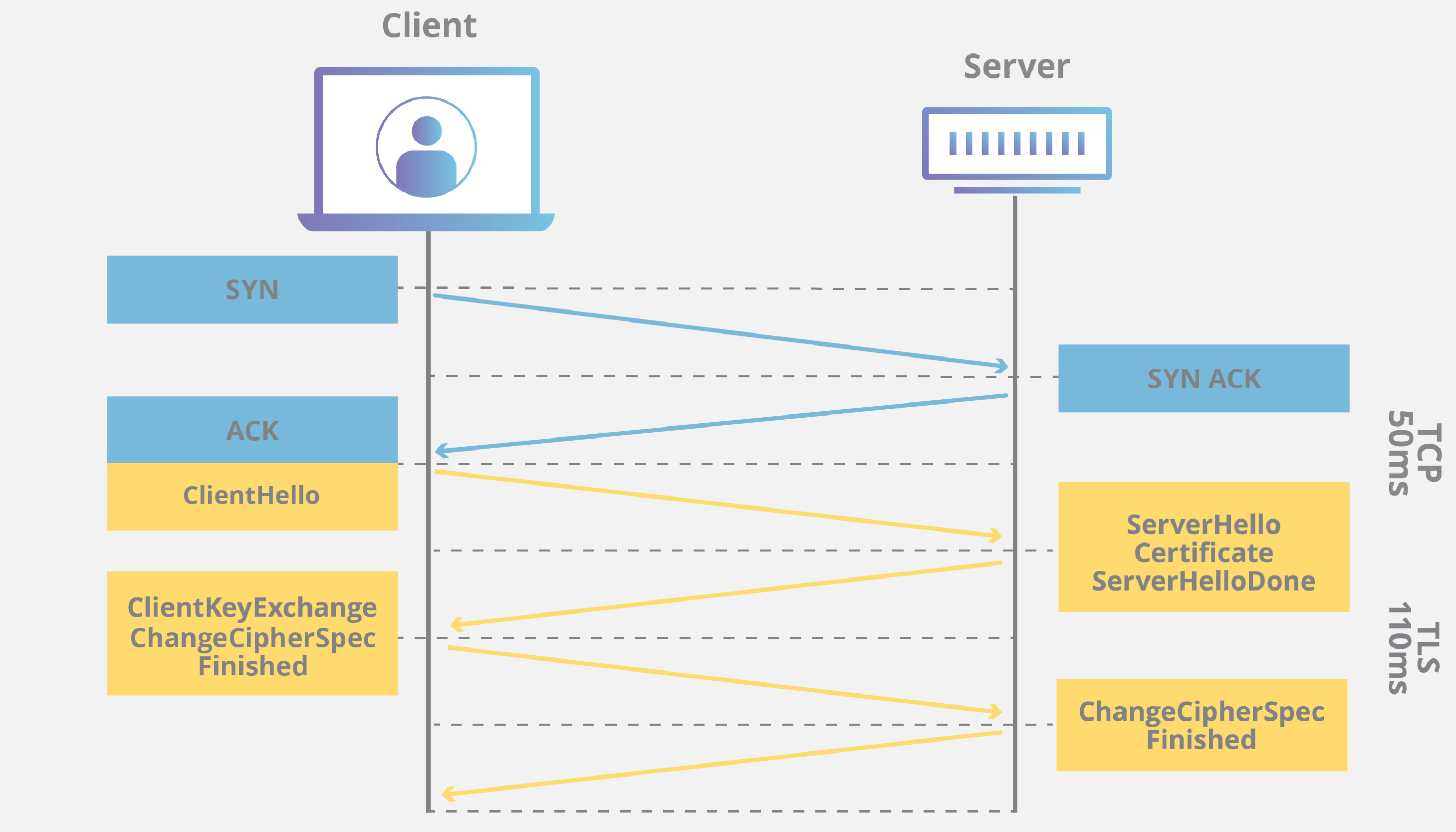
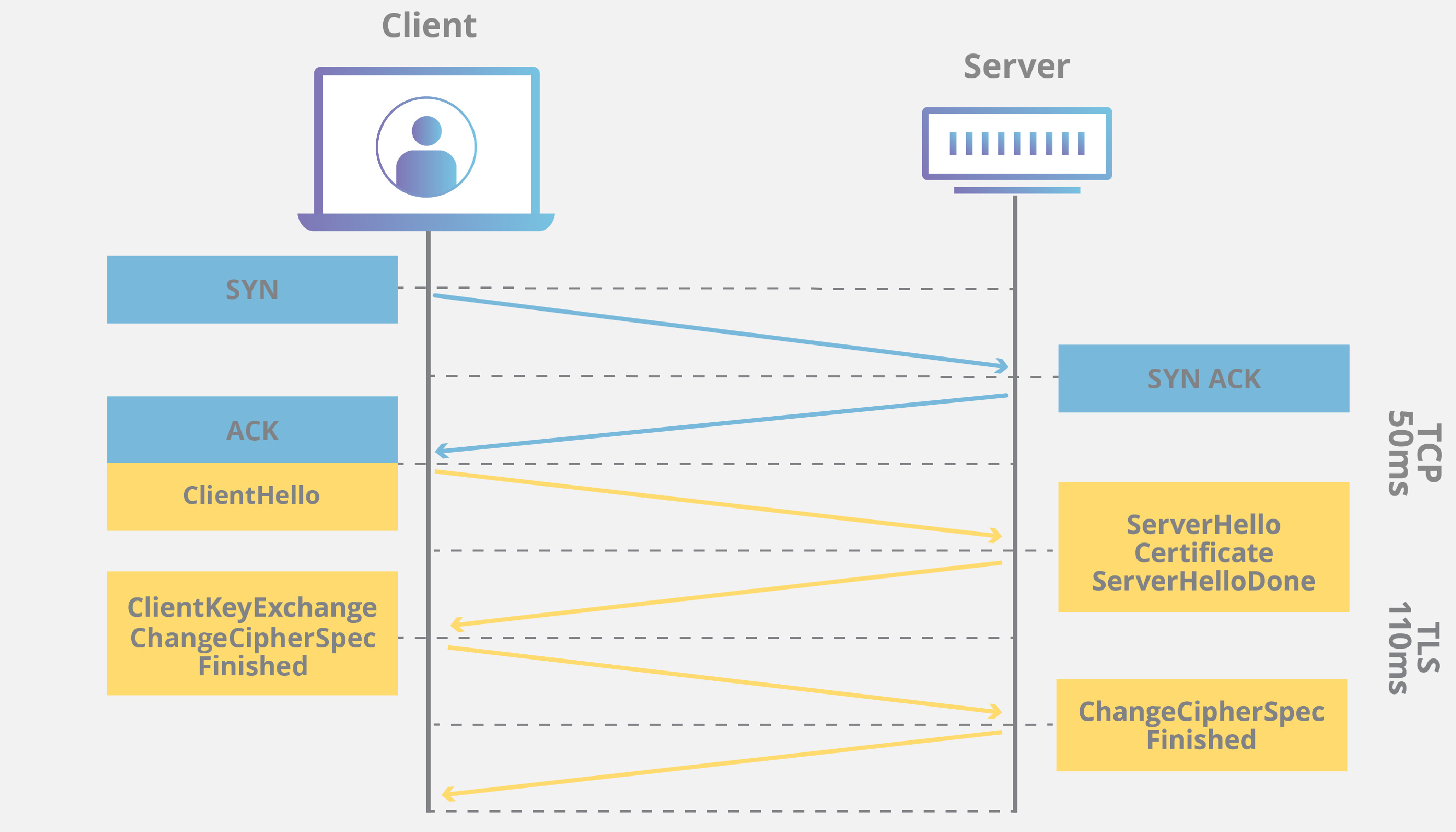
TLS (Transport Layer Security) is a cryptographic protocol that keeps network communication secure by encrypting data, ensuring privacy, integrity, and authentication. Its key functions are data encryption (uses symmetric and asymmetric cryptography to make intercepted data unreadable), server authentication (verifies server identity through a digital certificate issued by a trusted authority) and data integrity (ensures transmitted data remains unaltered during transit). Its steps are:
- Client Hello: The client (e.g., browser) sends supported TLS versions and cryptographic methods.
- Server Response: The server replies with its digital certificate and chosen TLS settings.
- Key Exchange: Both parties establish a secure, encrypted communication channel.
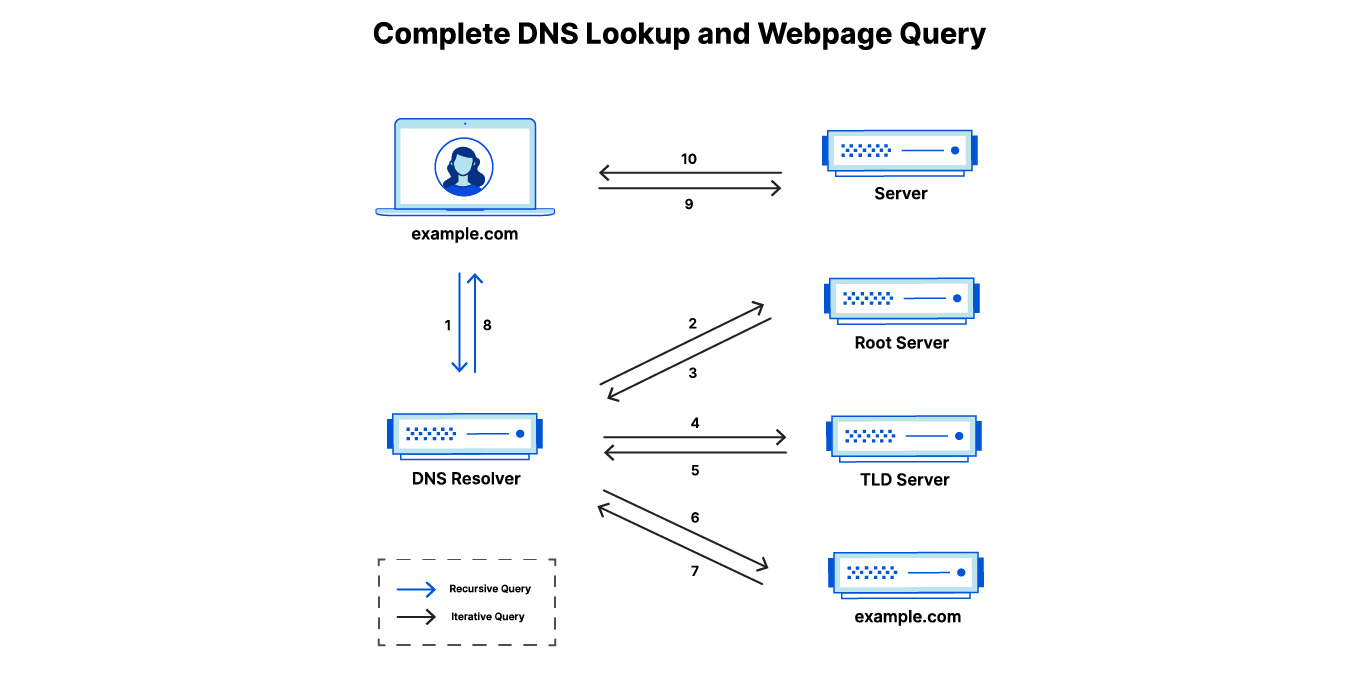
DNS (Domain Name System) is used to translate domain names into IP addresses. It acts like the phonebook of the internet, turning web URLs into IP addresses, here is the step-by-step process:
- User Request: You type a domain name into your browser.
- DNS Query: The browser sends a request to a DNS resolver to find the corresponding IP address.
- Response: The resolver checks its cache or queries other DNS servers (root, TLD, and authoritative servers) to retrieve the IP address.
- Connection: The browser uses the IP address to connect to the desired website or service.
Search engines for internet
Shodan continuously scans the internet indexing exposed devices and services. It can be used to track attacker infrastructure (C2, phishing kits, etc.) and monitor the attack surface for specific devices or software.
Censys also scans the internet and collects data about exposed systems, but it is more focused on TLS certificates, protocol details, and structured search.
Web sandboxes
urlscan.io: similarly to the previously discussed sandboxes, urlscan allows you to analyze websites in a safe environment, and explore what’s under the hood: scripts, redirects, trackers, etc. It’s perfect to track phishing kits, infected pages or quickly check sketchy links.
JA4+
JA4+is a set of network fingerprints for multiple protocols, and they have a lot of very practical applications, many of which are listed here. You may have heard about JARM fingerprint, JA4+ is basically that with superpowers. Personally, I mostly used it to track TLS servers in Censys: when the server responds to a TLS handshake a fingerprint of the response is generated, and then used to identify clusters of servers operated by the same actor.
crt.sh
crt.sh is a free website for looking up TLS/SSL certificates for any domain. It pulls the information directly from the Certificate Transparency (CT) logs: a public list recording every certificate issued by trusted Certificate Authorities (CAs). CT logs make it easy to spot newly issued certificates, like the ones used in phishing campaigns and domain impersonation.
Passive DNS
Passive DNS is like the “memory” of DNS: it works by collecting and storing DNS resolution data over time, creating a database of how domain names have resolved to IP addresses. Unlike normal DNS lookups, passive DNS allows to look at past DNS activity, which is useful for tracking malicious infrastructure, identifying related domains, and patterns in actors’ behavior.
📝 Quiz time!
- Assume you receive a malicious IP address, how would you investigate it? Which tools from this section would you start with?
- How could JA4+ help you link track threat actor’s infrastructure?
- What are some red flags that may suggest that a domain is hosting malicious content?
Misc
MISP
MISP (Malware Information Sharing Platform) is an open-source threat intelligence platform for sharing and ingesting IoCs, attack patterns, threat actor profiles, and other intelligence. MISP members rely on the community: organizations contribute indicators, which are then enriched and shared across trusted groups. It also integrates with a lot of other tools with APIs, so you can pull/push data automatically.
CyberChef
CyberChef is an open-source web-based tool with various functions for data analysis, transformation, and decoding, all using an intuitive drag-and-drop interface. It can handle and concatenate tasks like decoding Base64, extracting data from files, encrypting or decrypting text, and much more. Whenever I have something weird in front of me (an encoded string, a suspicious payload, or just some ugly logs), I throw it into CyberChef, it saves me from writing random scripts and lets me experiment quickly.
Programming
Although programming is not mandatory to enter the CTI field, it is definitely a nice-to-have skill and some jobs may require it; moreover, programming can help you automate repetitive tasks, process data, or enrich indicators.
Python is often considered the best choice to learn programming, because of its huge list of libraries for data analysis and security, but other useful languages can be Go (for performance and portability) or JavaScript (if your focus is to understand and analyze web-based threats).
📝 Bonus quiz time!
A list of questions that I was asked during interviews:
- Given a technical report (example 1, example 2, example 3, and 4), how would you advise your Incident Response team to detect this threat?
- How does the DNS resolution process work? Which stages can be abused by attackers?
- What are some red flags that make a newly registered website look suspicious?
- How would you prioritize Threat Intelligence feeds and alerts?
- How can you communicate CTI concepts to non-technical stakeholders?
Final notes
I’d like to keep this post up to date with relevant CTI topics, so be sure to reach out or comment in case you think I missed something or wrote something awfully wrong 🙃
External resources
Books, courses and links to expand on these topics:
- “Intelligence-Driven Incident Response”, by Rebekah Brown and Scott J. Roberts.
- “FOR578: Cyber Threat Intelligence”, a course by SANS.
- “CTI Training”, a free video course by MITRE ATT&CK.
- “Security infographics” by Thomas Roccia.
- “Pivot Atlas”, a pivoting handbook for CTI analysts.
如有侵权请联系:admin#unsafe.sh