
This article is based on the public release of Ghidra 11.2.
Documentation in code is great to have, although it is not as great a task to write it. When reverse engineering a binary with Ghidra, comments are your documentation. You might write down some notes for your future self, or for your colleagues or friends. Ghidra makes it easy for you to add a comment, as you can simply use the semicolon hotkey in the listing or decompiler view. The comment window allows you to select one of multiple comment types: EOL, plate, post, pre, and repeatable. This tip will dive into the different comment types.
Before diving into the different comment types, it is important to note that some comments do not show up on the location where they are entered. A prime example of this are conditions within the decompiled code, such as an if-statement. The reason as to why these comments aren’t added at the exact location where they are entered in the decompiler, is because the decompiled code is created based on nodes, and a comment is added to a node (which references an address). Do not think of the decompiled code as a line-by-line text, but rather as a tree with nodes.
EOL
The abbreviation EOL stands for End Of Line, which means that the comment is added at the end of the line.

Plate
Plate comments are often used when dealing with multi-line comments. These are not cut off for brevity, meaning that all information within them is clearly visible. You might also want to use them to avoid missing something important, as other comments tend to be shown on the right hand side in the disassembly listing view, whereas the plate comment is visible in the center and is hard to miss.

Post
The post comment puts the comment below the referenced address in the listing. This can be useful if you want to comment something below the address.

Pre
The pre comment functions like the post comment, but puts the comment before the given address. This is the only comment to also show up in the decompiler view.


Repeatable
The repeatable comment requires a bit more clarification, as it can be somewhat confusing. A repeatable comment is set in one place, after which it shows up at all cross references. This allows you to annotate a given address, and import the comment into other locations automatically. In the image below, the comment is set.
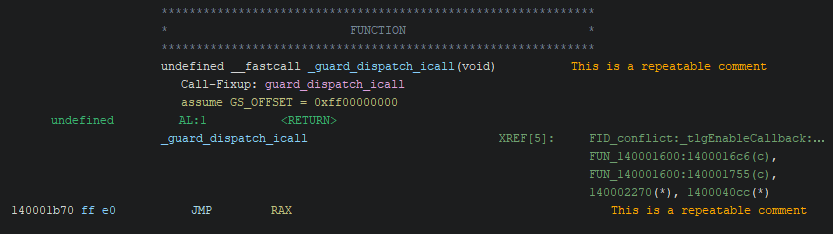
Upon finding a reference to said address, the comment shows up in a difference colour (also depending on your colour scheme). This makes it easier to recognise the repeatable comment.

To contact me, you can e-mail me at [info][at][maxkersten][dot][nl], or DM me on Twitter @Libranalysis.