苹果App Store因启用JavaScript源码映射(sourcemaps),导致前端代码泄露。用户通过Chrome扩展提取并公开代码,引发广泛关注。该漏洞在70%的组织中被检测到,可通过禁用生产环境中的sourcemaps修复。 2025-12-30 16:1:47 Author: securityboulevard.com(查看原文) 阅读量:3 收藏
On November 4, 2025, Apple shipped its redesigned App Store website. However, it came with a surprise: JavaScript sourcemaps enabled in production. Within hours, it enabled some to download Apple’s entire front-end codebase directly from the production site. They used a Chrome extension to extract and save all the available resources from the web App Store, and decided to archive them on GitHub for educational purposes.
Here's why we're talking about it: with Escape DAST, we've found this exact same issue in 70% of different organizations using Escape. It's one of the common vulnerabilities we detect when scanning external assets. Apple just happened to be the high-profile example that made headlines.
Let's dig into what happened and how to prevent it.
Automate leaked sourcemaps discovery
Ensure exposed sourcemaps never slip through the cracks
What Actually Happened
Apple launched their new App Store interface at apps.apple.com. A user, rxliuli, on GitHub simply opened their browser's dev tools, noticed sourcemap files loading, and used a "Save All Resources" Chrome extension to extract everything. The result was a complete reveal of their front-end code:
- Complete Svelte/TypeScript source code
- State management logic
- UI components
- API integration code
- Routing configuration
The repository was eventually taken down, but not before being forked 8,000+ times. Since then, forks have been taken down as well.
What Are Source Maps Anyway?
When you build a modern web app for production, your JavaScript gets minified and bundled. This makes it smaller and faster, but completely unreadable for debugging. Source maps are files that let you map that minified mess back to your original, readable source code.
During development, this is great. You get clear error messages with actual variable names and line numbers. In production, though, leaving them on means anyone can read your original source code.
Here's the difference. This is minified code:
function a(b,c){return b+c}const d=a(1,2);
With source maps enabled, anyone can see your original code:
function calculateTotal(price, tax) {
  return price + tax;
}
const totalAmount = calculateTotal(basePrice, taxAmount);
Your build tool adds a comment at the bottom of your JavaScript files pointing to the source map:
//# sourceMappingURL=/path/to/file.js.mapIf that .map file is accessible on your server, anyone can download it and reconstruct your source code.
How Common Is This?
Very. We’ve detected exposed source maps in 70% of organizations shipping production apps with sourcemaps that anyone can download.
A quick search on HackerOne and Bugcrowd reveals reports from major companies spanning multiple years:

How We Detect It
The vulnerability is straightforward to find. We scan JavaScript files on external-facing assets, check whether they reference sourcemap files, and verify that those source maps are accessible without authentication.
Our algorithm looks for patterns like https://example.com/file.js.map or https://example.com/static/js/file.js.map
When we find one, we flag it as "Exposed Source Map" - low severity and put alert under the information disclosure category. The alert looks like:
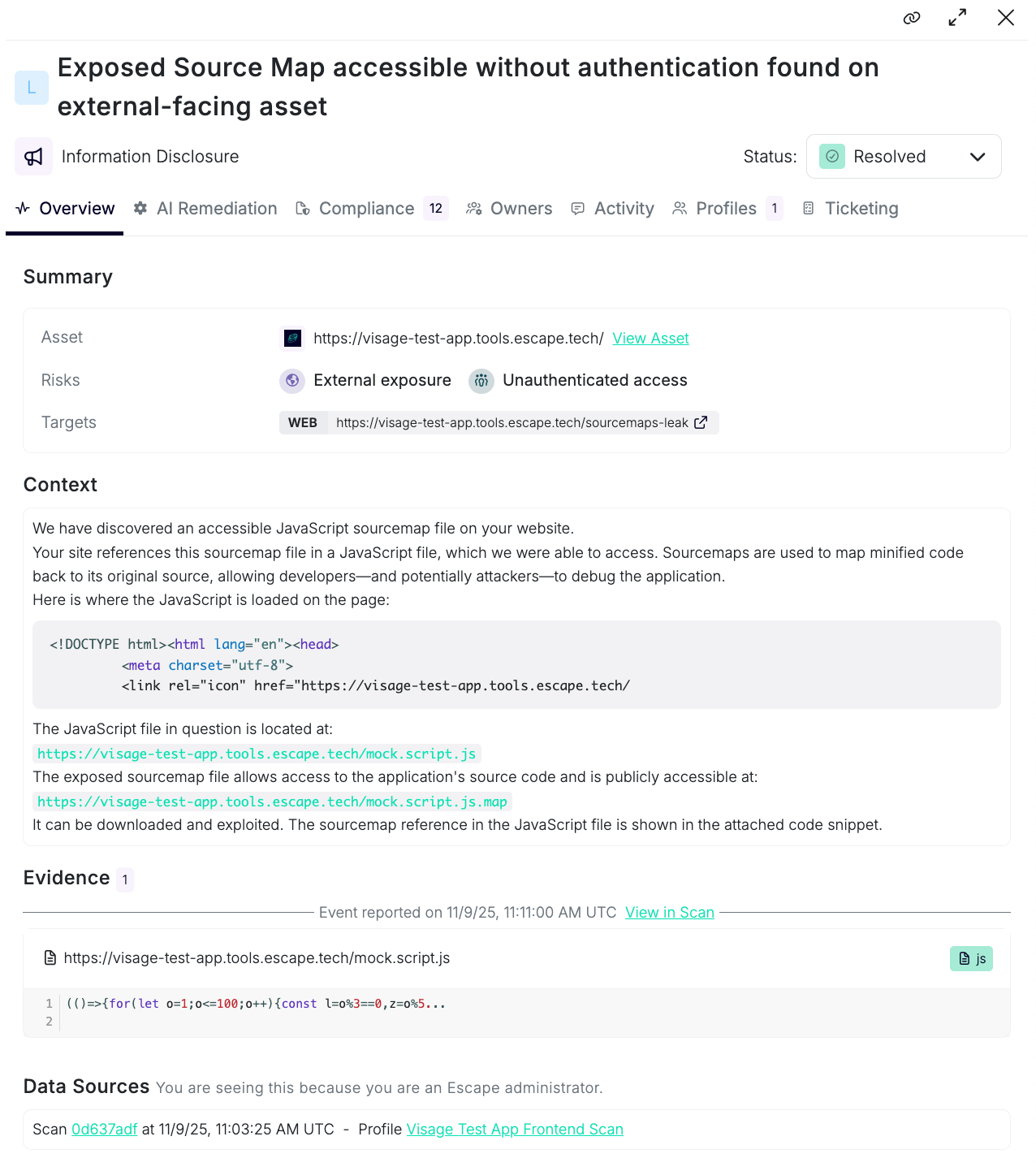
The nice thing about this vulnerability is that it's completely straightforward. Either the sourcemap is accessible or it isn't.
How to Fix It
The fix is simple: disable sourcemaps in your production builds.
You can do this by adjusting your build configuration or using a server-side temporary approach.
Let’s take an example of Svelte applications. You can modify your build setup to prevent sourcemaps from being generated or served. If you're using a bundler like Rollup or Vite, you can set the appropriate configuration:
For Rollup, update your rollup.config.js:
// rollup.config.js
export default {
// Your existing configuration
output: {
 sourcemap: false // Disable sourcemaps
}
};
For Vite, update your vite.config.js:
export default defineConfig({
  build: {
    sourcemap: false // Disable sourcemaps
  }
})
If you still need sourcemaps during development, ensure that your production build outputs them to a specific directory not served by your production server. You can configure your server to deny access to .map files.
Another way is to set your web server to return a 404 status for requests to the sourcemap files, ensuring they're not accessible. Here’s an example using an nginx configuration:
location ~* \.map$ {
    return 404; // Deny access to any .map files
}
By implementing these changes, you will significantly reduce the risk associated with exposed source maps, minimizing the chance of inadvertently disclosing sensitive source code and application logic. Regularly audit your production deployment to ensure these configurations are in place and maintained.
Check Your Own Build
Want to see if you're affected? Open your production site in Chrome DevTools, go to the Network tab, and look for any .mapfiles loading. Or just check your JavaScript sources - if you can read your original variable names and comments, you've got sourcemaps enabled.
💡
Always assess what information is available in the sourcemap and how it could be leveraged. If sensitive code, variable names, or application logic are exposed, this confirms the vulnerability's severity. In some cases, an exposed sourcemap can even lead to account takeover.
The Bigger Picture
This Apple incident is a good reminder that even large companies with security teams miss basic configuration issues. The problem isn't lack of knowledge - most developers know sourcemaps shouldn't be in production. The problem is that it's easy to forget, and there's usually no automated check catching it.
That's where dynamic application security testing tools come in. They run these checks automatically across all external assets. When we find exposed sourcemaps, teams get alerted immediately.
If you're shipping JavaScript to production, take two minutes to verify your sourcemaps are off. And if you want something checking this for you continuously, that's literally what we built Escape to do!
💡 Check out more content below:
- Agentic Pentesting: The Complete Guide
- Fixing Vulnerabilities Directly in your IDE with Escape MCP
- Reproduce complex exploits in Escape
- Best AI pentesting tools
*** This is a Security Bloggers Network syndicated blog from Escape DAST - Application Security Blog authored by Alexandra Charikova. Read the original post at: https://escape.tech/blog/apple-app-store-source-map-leak/
如有侵权请联系:admin#unsafe.sh