2025年“浏览器漏洞年”项目揭示了现代浏览器的关键安全缺陷,包括Syncjacking攻击、多态扩展、AI侧边栏欺骗等11项重大漏洞,影响企业数据安全与隐私保护。 2025-12-10 13:59:58 Author: securityboulevard.com(查看原文) 阅读量:1 收藏
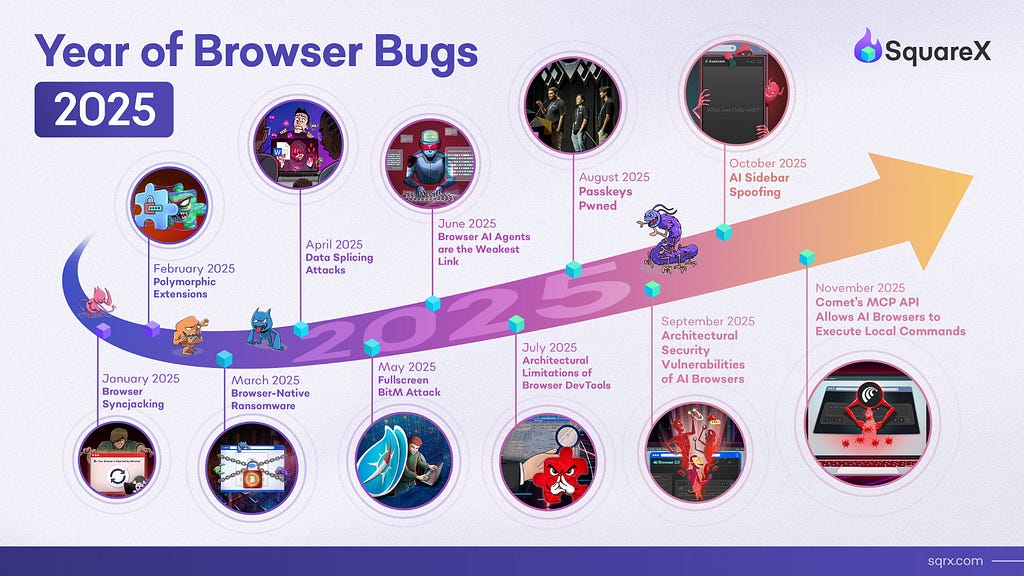
At the beginning of this year, we launched the Year of Browser Bugs (YOBB) project, a commitment to research and share critical architectural vulnerabilities in the browser. Inspired by the iconic Months of Bugs tradition in the 2000s, YOBB was started with a similar purpose — to drive awareness and discussion around key security gaps and emerging threats in the browser.
Over the past decade, the browser has become the new endpoint, the primary gateway through which employees access SaaS apps, interact with sensitive data, and use the internet. The modern browser has also evolved significantly, with many capabilities that support complex web apps that parallel the performance of native apps. As with all new technologies, the very same features are also being used by malicious actors to exploit users, exploiting a massive security gap left by traditional solutions that primarily focus on endpoints and networks. Compounded with the release of AI Browsers, the browser has become the single most common initial access point for attackers. Yet, it remains to be poorly understood.
The YOBB project aims to demystify these vulnerabilities, by highlighting architectural limitations, behavioral trends and industry dynamics that cannot be fixed by a simple security patch. In the past 12 months, we released 11 research pieces, including major zero day vulnerabilities presented at DEF CON, Black Hat, RSA and BSides. Below is a recap of our findings, and the complete Year of Browser Bugs report is available for download here.
January 2025: Browser Syncjacking Attack

The Browser Syncjacking attack demonstrated that browser extensions, even just with simple read/write permissions available to popular extensions like Grammarly, can lead to full browser and device takeover by exploiting Google Workspace’s profile sync functionality. The attack unfolds in three escalating stages: profile hijacking, browser hijacking, and device hijacking.
- Profile Hijacking — the malicious extension, disguised as an AI tool, logs the user into an attacker managed Chrome profile while the user is idle. This immediately allows the attacker to disable security features in the browser. The attacker can then further trick the user into syncing Chrome with the managed Google profile, giving attackers full access to all credentials and browsing history stored locally.
- Browser Hijacking — the same extension intercepts legitimate downloads like Zoom updates, replacing the file with the attacker’s malicious executable containing an enrollment token and registry modifications. Believing they’re installing a Zoom update, the victim runs the file, which installs registry entries that convert their browser into a managed browser under the attacker’s Google Workspace control.
- Device Hijacking — The same malicious file can also inject registry entries enabling the extension to communicate with native applications directly, bypassing additional authentication requirements. With this connection established, attackers leverage the extension alongside the local shell to gain complete device access — executing system commands, covertly activating cameras and microphones, capturing keystrokes, and accessing all applications and sensitive data on the machine.
As covered by:
👉 Learn more on our technical blog & demo
February 2025: Polymorphic Extensions

Polymorphic extensions are malicious extensions that can silently impersonate any extension, such as password managers and crypto wallets. The attack exploits end users’ reliance on visual cues to determine whether what they are interacting with is safe, and the fact that extensions can change their icons and appearance on the fly without any user warning. With additional permissions, these malicious extensions can even disable the real extension while they impersonate them.
- The user installs and pins a malicious extension, masquerading as a productivity tool.
- After some time, the extension disables and impersonates the user’s password manager, by creating pixel-perfect replicas of the target extensions’ icon, HTML popups and workflows.
- The extension injects a HTML popup that prompts the user to re-login to their password manager.
- The user enters their master password, which is used by the attacker to login to the real password manager and access all passwords on the user’s vault.
As covered by:
👉 Learn more on our technical blog & demo
March 2025: Browser Native Ransomware

Browser-native ransomware represents a fundamental shift in ransomware delivery that enables ransomware attacks to be executed without any local files or process, bypassing traditional anti-ransomware and EDR tools. Due to the proliferation of cloud storage and SaaS services, over 80% of enterprise data now resides in the cloud and is primarily accessed through the browser. By combining identity attacks and agentic workflows, attackers can systematically exfiltrate and hold sensitive files and data hostage for ransom. While BNRs manifest in many ways, here a few case studies:
- File Storage BNR — via consent phishing (i.e. OAuth attacks), the attacker tricks users into granting their malicious app permission to “see, edit, create and delete all Google Drive files”. With AI agents, the attacker then systematically exfiltrates and deletes all files in the drive, including those shared by colleagues & customers, leaving a ransom note in place threatening to leak the data.
- Email BNR — similarly, disguised as a legitimate tool, the attacker’s app requests permissions to “read, compose, send and permanently delete all email from Gmail”. Once granted, the attacker exfiltrates all emails to identify every SaaS app the victim is registered with by scraping welcome, notification, and billing emails. Using an AI agent, the attacker systematically resets passwords to these apps, logs the victim out, exfiltrates all data, and uploads ransom notes demanding payment in exchange for passwords and not leaking the data.
As covered by:
👉 Learn more on our technical blog & demo
April 2025: Data Splicing Attacks

Disclosed at BSides SF, Data Splicing Attacks represent a new class of data exfiltration techniques capable of bypassing major enterprise DLP solutions listed by Gartner’s Magic Quadrant. The research exposed fundamental architectural flaws in both endpoint-based and proxy-based DLP solutions that allow attackers to upload/paste/print any sensitive data through the browser with several techniques:
- Data Smuggling via Alternate Communication Channels — exfiltrating data via binary communication channels such as WebRTC and gRPC that are unmonitored by cloud SASE/SSE DLP or endpoint DLP solutions
- Data Sharding — breaking files/data into small “shards” that individually do not trigger regex detection, only to reassemble them after DLP inspection
- Data Ciphering — encrypting files, only to decrypt them after DLP inspection, exploiting the fact that most DLP solutions blanket block/allow encrypted files that they do not have decryption keys to inspect
- Data Transcoding — encoding file/data with encoding techniques like Base64 such that they evade regex-based DLP policies, only to decode them post-inspection after file download or right before paste/upload
- Data Insertion — inserting small characters in background color between texts to break regex, allowing sensitive files to be printed without triggering DLP policies
As covered by:
📽️ Watch the BSides SF talk here
May 2025: Fullscreen BitM

While Browser-in-the-Middle (BitM) attacks have been known since 2021, they typically come with a major telltale sign — the parent window still displays a suspicious URL in the address bar, raising suspicion among security-aware users. Our research discovered that the Fullscreen API can be exploited to address this flaw, as any user interaction can be used to trigger a fullscreen popup containing the attacker controlled noVNC window. Not knowing that they are now interacting with an attacker-controlled browser, the victim continues their work, unknowingly giving attackers access to watch everything they do as they open additional tabs and access enterprise apps, all while thinking they’re on their own browser.
- The user lands on a phishing site impersonating a popular SaaS app (like Figma) through malvertising or SEO poisoning.
- When the user clicks what appears to be a normal “Log in” button, it triggers the Fullscreen API to expand a previously hidden BitM window to fullscreen.
- The fullscreen window displays the attacker’s remote browser showing the legitimate login page, completely covering the parent window’s suspicious URL.
- The user enters their credentials on the real site displayed in the attacker’s remote browser, successfully logging in without any indication of compromise.
- The user continues working — opening additional tabs and accessing other enterprise apps — all within the attacker-controlled remote browser under constant surveillance.
While all browsers are vulnerable to Fullscreen BitM, the attack works especially well on Safari due to the complete lack of visual indicators when entering fullscreen mode.
As covered by:
👉 Learn more on our technical blog & demo
June 2025: Browser AI Agents: The “New Weakest Link”

Since OpenAI launched Operator, AI agents have exploded in adoption, with 79% of organizations deploying agentic workflows today. Unfortunately, these agents are trained to do tasks, not to be security aware, making them even more vulnerable than an average employee. We demonstrated how browser AI agents fall prey to rudimentary attacks like phishing and OAuth attacks, leading to data exfiltration and malicious file download. Critically, these agents operate at the same privilege level as users, having full access to the same enterprise resources with little guardrails on agentic workflows.
Since our research, multiple agentic AI providers have improved their security guardrails, often requiring permissions when high risk actions are performed. However, these features are built at the discretion of the AI vendor. There is yet to be an industry standard for AI vendors and enterprises alike when it comes to Agentic Identity and Agentic DLP, which becomes especially challenging with the volume of AI applications being built every day.
As covered by:
👉 Learn more on our technical blog & demo
July 2025: Architectural Limitations of Chrome DevTools

The past few years witnessed a surge in malicious browser extensions, including Geco Colorpick and the Cyberhaven breach. Most extensions are downloaded from official stores like Chrome Web Store, leading enterprises to heavily depend on browser vendors to conduct security audits, trusting labels like “Verified” and “Chrome Featured Extension” as security indicators. Unfortunately, attackers can easily game the system with fake reviews and mass downloads. Indeed, numerous verified extensions have been discovered as malicious.
Yet, there is still very little end users can do to inspect extension behaviors in the browser, even with the Developer Tools provided by browser vendors. This YOBB highlights how trivial it is for malicious extensions to hide suspicious activity from DevTools by exploiting several key limitations:
- Difficulty debugging content and service workers simultaneously
- No visibility into message passing and internal communications between extension components
- No source attribution for injected JavaScript (webpage vs. extension)
- Limited network traffic logging that extensions can easily circumvent
- No insights into offscreen documents to inspect background processes, hidden extension pages, and time/action-triggered behaviors
As covered by:
👉 Learn more on our technical blog & demo
August 2025: Passkeys Pwned: Turning WebAuthn Against Itself

At DEF CON 33, we disclosed a major implementation flaw in passkeys that allows attackers to intercept and forge the passkey registration and authentication flows, replacing it with the attacker’s key pair.
- Via a malicious script/browser extension, the attacker force fails the passkey authentication, forcing the user to re-register their passkey
- The attacker intercepts the call during the passkey registration, and generates its own private and public key
- The malicious extension stores the private key locally (or sent to the attacker for login via their device) and sends the public key to the service provider’s server
- When an authentication occurs, the extension/script intercepts this call too and signs the challenge with the stored attacker private key
- Since the public key stored on the server is part of the malicious pair the attacker generated during registration, the authentication check succeeds
Note that in both the registration and authentication flow, the user still enters their biometrics/PIN, a visual indicator that many associate with good security. However, in both scenarios, the authenticator’s response is dropped and replaced with the attacker’s public key/signed challenge before it ever reaches the server.
As covered by:
👉 Learn more on our technical blog & demo
September 2025: Architectural Security Vulnerabilities of AI Browsers

When Perplexity released Comet in July 2025, it brought to light what the future of browsers could look like. Our research deep-dived into AI Browsers to uncover how attackers can exploit AI Browsers, including:
- Falling into malicious workflows while surfing the internet — e.g. falling to consent phishing attacks while completing a research task, granting excessive OAuth permissions to malicious apps for full access to the user’s Gmail and Google Drive without the user’s knowledge
- Falling into malicious instructions in trusted apps — e.g. following malicious instructions in emails & trusted SaaS apps to share confidential documents and add malicious links to calendar meetings
- Downloading malicious files — e.g. downloading malware while trying to complete a form, even when the original user prompt never requested any downloads
Many other researchers in the community have also voiced similar concerns on prompt injection attacks that led AI Browsers to go rogue. Since then, popular AI Browsers like Comet and Atlas have started adding guardrails that require explicit user permissions for certain agentic tasks. This marks an encouraging example of what can be achieved when security researchers and innovators collaborate to make emerging technologies more secure.
As covered by:
👉 Learn more on our technical blog & demo
October 2025: AI Sidebar Spoofing
Building on our previous AI Browser research, AI Sidebar Spoofing attacks involve malicious extensions that can inject a pixel-perfect replica of AI sidebars. By impersonating the very interface that users trust to interact with these AI browsers, it then generates malicious instructions that eventually lead to phishing, malicious file download and even device takeover.

As covered by:
👉 Learn more on our technical blog & demo
November 2025: Comet MCP API
We discovered a poorly documented MCP API in Comet that allows its embedded extensions to execute arbitrary local commands without explicit user permission. Critically, the MCP API is made available by default to Comet’s embedded extensions, which is installed by default, hidden from the extension dashboard, and cannot be disabled by users even if it is compromised.
In our attack POC, we used extension stomping to demonstrate how the MCP API can be misused to execute ransomware. However, in reality, it is more likely that this exploit will be done via XSS and network MitM in the wild as it requires minimal end user involvement. One day after the release, Comet made a silent update that disabled the MCP API. While we have not received official acknowledgement of our bug report, the patch is a positive move towards making the AI Browser safer.

As covered by:
👉 Learn more on our technical blog & demo
Secure Any Browser and Any Device
SquareX’s browser extension turns any browser on any device into an enterprise-grade secure browser. SquareX’s industry-first Browser Detection and Response (BDR) solution empowers organizations to proactively defend against browser-native threats including rogue AI agents, Last Mile Reassembly Attacks, malicious extensions and identity attacks. Unlike dedicated enterprise browsers, SquareX seamlessly integrates with users’ existing consumer browsers, delivering security without compromising user experience.
Ready to experience award-winning browser security? Visit www.sqrx.com to learn more or sign up for an enterprise pilot.
2025 Year of Browser Bugs Recap:
A Year of Unmasking Critical Browser Vulnerabilities was originally published in SquareX Labs on Medium, where people are continuing the conversation by highlighting and responding to this story.
*** This is a Security Bloggers Network syndicated blog from SquareX Labs - Medium authored by SquareX. Read the original post at: https://labs.sqrx.com/2025-year-of-browser-bugs-recap-e3f8fc617129?source=rss----f5a55541436d---4
如有侵权请联系:admin#unsafe.sh