
Effective cyber security depends on knowing which risks matter most. ANY.RUN’s Threat Intelligence Lookup provides industry and geographic context, powered by live attack investigations from 15,000+ companies, that SOC teams need to prioritize alerts, IOCs, and threats with confidence and build their defense strategy for maximum ROI.
Here’s how.
Challenge: Context-free TI Wastes SOC Time
Most threat intelligence sources return long lists of IPs, domains, and hashes, but they rarely explain how those indicators map to a specific sector or region. SOC teams end up treating every threat as equally important, spreading detection and hunting efforts thin and burning time on noise instead of the threats that actually appear in their environment.
For MSSPs, the problem is even sharper: they serve clients from many fields at once. The lack of industry or geo context makes it hard to prioritize work and hard to prove value to clients who expect sector-aware monitoring.
Solution: Industry & Geo Threat Landscape for Every Indicator
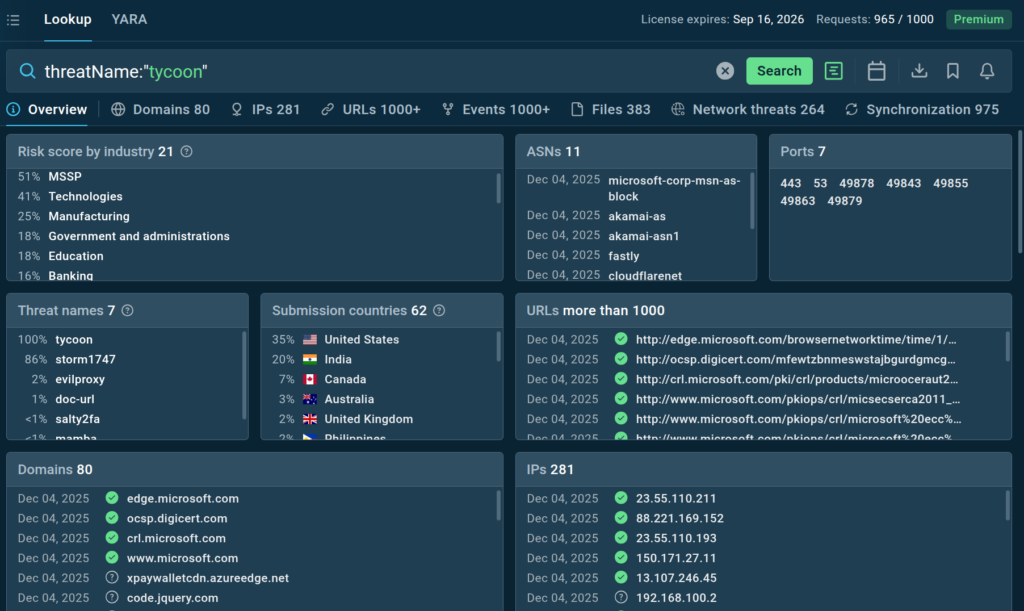
TI Lookup now adds an extra layer of context on top of every Premium search query. In addition to listing IOCs, IOAs, IOBs, and sandbox sessions, it builds a real-time snapshot of which industries and countries are most commonly associated with the threat or indicators you queried.
The functionality provides three key context fields:
| Field | Description | Benefit |
|---|---|---|
| Risk score by industry | Likelihood (%) that the queried threat/indicator is linked to attacks on each industry based on the search results. | See how likely your industry toface similar threats to prioritize defenses. |
| Threat names | How often (%) each threat appears in the current search results. | Discover the most likely threats related to your query for focused investigation and response. |
| Submission countries | How often the queried threat/indicator appears in submissions from each country based on the search results. | See where relevant threats are reported the most to uncover geographic hotspots and trends. |
TI Lookup now turns your threat landscape into a live, industry-aware radar. It shows exactly how a given threat or indicator maps to specific sectors and countries, so you see where it really matters for your business instead of drowning in generic feeds.
Powered by real-time analysis of attacks on 15,000 organizations worldwide, it helps you connect threats, techniques, and affected industries, surface niche campaigns, and act before they hit your environment.
How SOCs Use it in Daily Workflows
There are several use cases for TI Lookup’s threat landscape functionality.
1. Starting from a known threat
A Tier 2–3 analyst already knows the threat or malware family involved.
They open TI Lookup, search by threat name, and review the industry breakdown in the Threat names view.
Example:
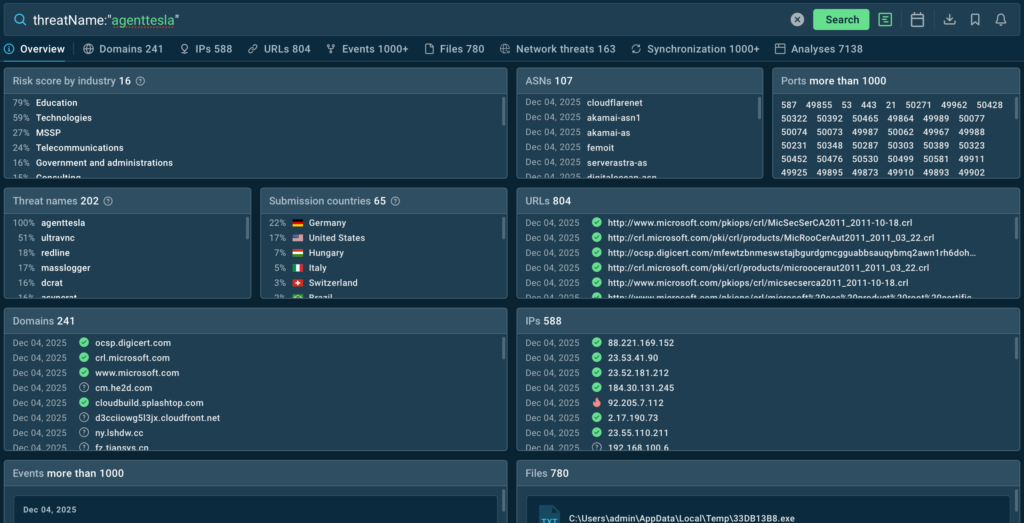
The landscape view shows that Agent Tesla is related to malicious activity in industries like education, technologies, telecommunications, and finance. The analyst can see whether their own sector shows up or stays near zero.
If the match is strong, the analyst treats it as highly relevant, assesses risk, and pulls only the domains, IPs, and other artifacts that make sense for their company.
2. Starting from an industry
An analyst, a SOC lead, or even a CISO wants to see an existing threat landscape for their company’s sector. They query by industry to get a list of Threat names that most often appear in samples linked to that vertical.
Example:
industry:”finance” AND submissionCountry:”germany”
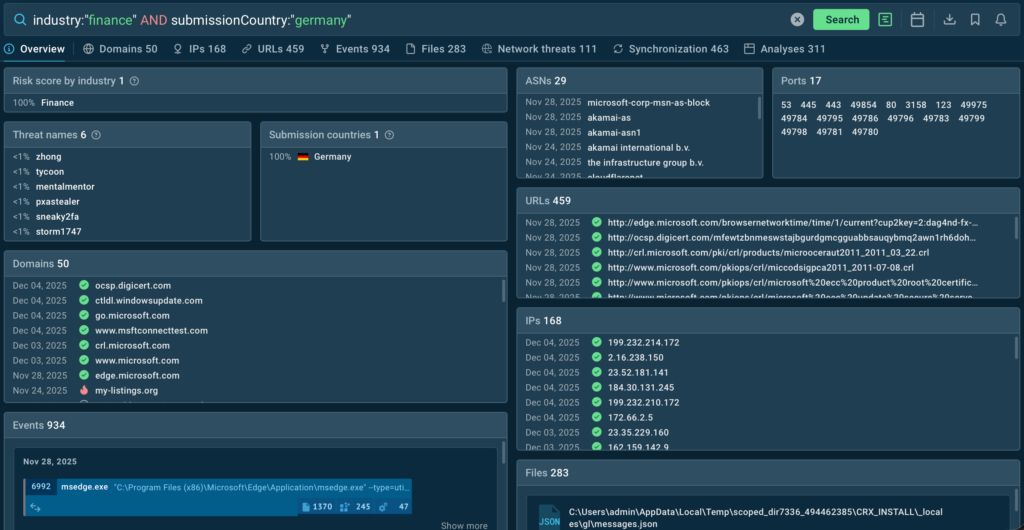
For German companies in finance, the most relevant threats according to TI Lookup are Tycoon2FA, Zhong Stealer, PXA Stealer, and several others.
From there, the user can refine the query (for example, by a threat type) to uncover the most relevant connections for their environment.
TI Lookup also makes it possible to set up Query Updates that notify the users about new results for their queries. This way, they can continuously receive new info about threats related to the industry.

3. Starting from any IOC or behavior
An analyst starts with any IOC, behavior, or pattern that is not explicitly tied to Industries or Threat names. Say your SIEM detects a suspicious connection. The SOC analyst in charge submits it to TI Lookup and instantly gets full context.
Example:
domainName:”productivelookewr.shop”
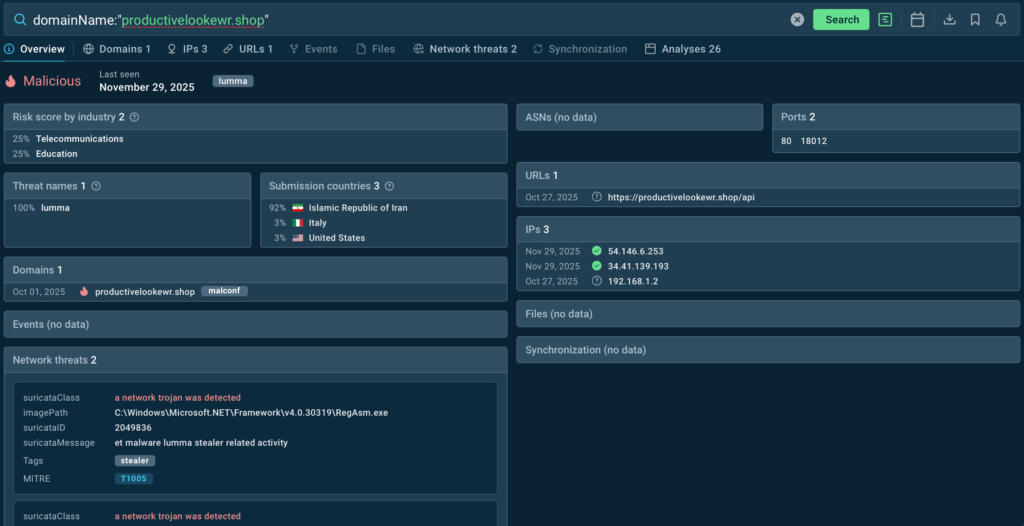
TI Lookup instantly shows that the indicator belongs to the Lumma Stealer and appears in threat samples related to telecommunications and technologies companies in Italy and the United States.
This insight helps the analyst judge how relevant and serious the activity is for their own organization or clients. It also guides the next actions: escalating the alert, looking for similar activity, collecting related artifacts, and updating detection rules.
4. Starting from an existing security gap
A CISO or SOC Head knows the company has already faced several incidents related to a certain type of threat. They can pivot on it and combine this with the industry and organization’s country.
Example:
Let’s say a security lead in a finance organization sees that the company struggles with phishing. With TI Lookup, they can uncover what common phishing attacks are analyzed by similar businesses in their country:
industry:”Finance” and submissionCountry:”br” and threatName:”phishing”
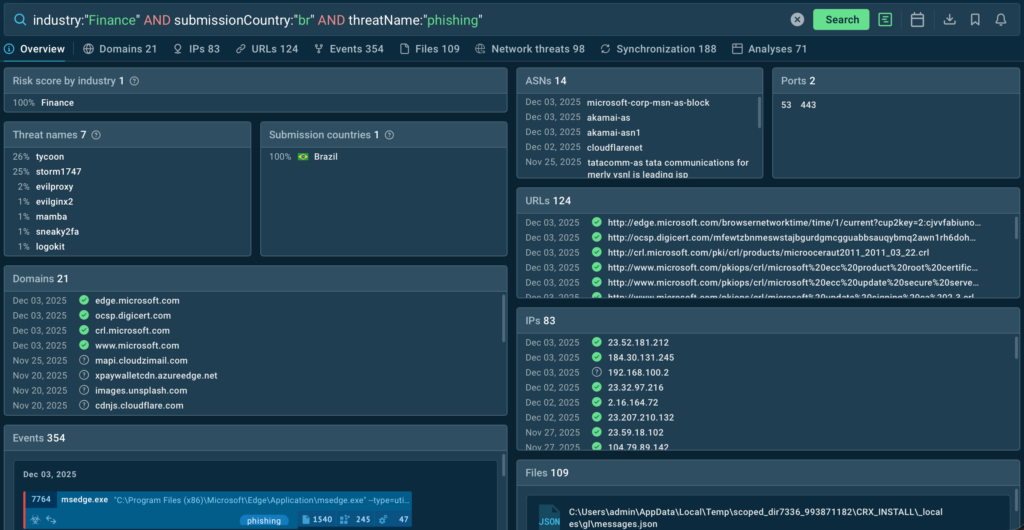
They receive the most common threat names (Tycoon2FA, Storm1747) and sandbox analyses of real-world threats with indicators. This becomes a live backlog for detection engineering, threat hunting hypotheses, and training cases tailored to that sector instead of generic global lists.
Next, the security lead works with the SOC to turn these threats into concrete actions: prioritizing detections and playbooks for the most common phishing families, rolling out focused awareness training, and tightening controls around the channels those campaigns abuse.
Benefits for SOCs and MSSPs
TI Lookup together with the new Industry & geo threat landscape functionality provide a significant value to security teams.
For CISOs and MSSP leads
- Faster, scalable prioritization of threats per client segment (finance, healthcare, manufacturing, etc.).
- Standardized rules and hunting scenarios by industry and country for consistent service quality.
- Clear evidence in reports that monitoring accounts for sector and regional risk.
A managed security provider can group clients by industry and region and use TI Lookup to pull the most relevant threat names for each segment. This can help them standardize rule sets and hunting scenarios for finance, healthcare, manufacturing, and other spheres.
For any new threat, they can quickly check which industries and countries it most often appears in and flag the matching customers as higher risk. They then can export the associated domains, IPs, and other artifacts and roll out protections to all affected environments in one go.
For SOC leads
- Quick view of which threats are truly applicable to the organization’s industry and geography.
- Sharper focus for detections, playbooks, and training content around the most relevant threats.
- Immediate access to domains/IPs/artifacts for blocking and hunting when a known threat appears.
A SOC lead can start by querying TI Lookup for their own industry and country to get a ranked list of the most applicable threat names. This immediately shows which families and campaigns should drive new detections, playbooks, and training.
When a known threat appears, they can use the same view to see which industries it is most often associated with. If their sector is high on the list, they can raise the priority, pull the related domains, IPs, and artifacts, and push them into blocking and hunting across their environment.
For SOC Tier 2–3 analysts
- Less noisy TI and faster understanding of where each threat actually matters.
- Simple pivots: from threat to industries/countries and from industries/countries to relevant threat names.
- Rich artifacts to enrich cases, accelerating triage, incident response, and hunting accuracy.
Tier 2–3 analysts are often overwhelmed with alert noise and need to know whether a given threat actually matters for a specific case or industry. With TI Lookup, they can start from a threat name and immediately see how it breaks down by industries and countries, or start from an industry/country and get the most relevant threat names back.
For each query, they also receive concrete artifacts like domains, IPs, and other indicators to enrich their cases. This speeds up triage, incident response, and threat hunting, while making the recommendations they give to the SOC lead more accurate and grounded in real-world context.
How It Impacts Key Metrics
The industry & geo threat landscape in TI Lookup improves the SOC metrics that matter most by adding instant industry and country context to every search:
- Shorter Mean Time to Detect: Analysts immediately see whether a threat is actually observed in their industry and regions, so they confirm real incidents faster instead of spending time qualifying generic indicators.
- Faster Mean Time to Respond: Each relevant landscape slice comes with ready IOCs and behavior context from real sandbox runs, shortening investigation steps and helping teams move to containment and remediation sooner.
- Lower false positive rate: Alerts tied to threats that never appear in the organization’s industry or geography can be safely downgraded, reducing noise and cutting time spent on benign events.
- Wider detection coverage: Detection engineering uses industry and geo statistics from TI Lookup to prioritize rules and playbooks for the threats that most often impact similar organizations.
- Better analyst performance per incident: With clearer relevance and richer context up front, analysts can close more meaningful cases per shift instead of circling around low-value alerts.
Try Threat Intelligence Lookup in Your SOC
TI Lookup with the geo & threat landscape functionality is available to all Premium subscription users. Contact us to request a trial access to see how our solution can accelerate and improve the work of your security team.
Conclusion
Threat Intelligence Lookup reveals critical industry and geographic context in every threat search. Analysts can turn scattered IOCs into actionable insights that are relevant to your organization. Narrow the global threat landscape for more efficient proactive research and threat hunting.
Backed by real-time analysis from 15,000 organizations, TI Lookup helps teams prioritize faster, sharpen detection, reduce false positives, and improve MTTR. Security teams can finally focus on the threats most likely to impact their specific environment and proactively set up defenses.
About ANY.RUN
As a leading provider of interactive malware analysis and threat intelligence, ANY.RUN is trusted by over 500,000 analysts across 15,000 organizations worldwide. Its solutions enable teams to investigate threats in real time, trace full execution chains, and surface critical behaviors within seconds.
Safely detonate samples, interact with them as they run, and instantly pivot to network traces, file system changes, registry activity, and memory artifacts in ANY.RUN’s Interactive Sandbox. For threat intelligence insights, integrate TI Lookup and TI Feeds supplying enriched IOCs and automation-ready intelligence. No infrastructure maintenance is required.