
Check Point Research发现Microsoft Teams存在四个安全漏洞,允许攻击者冒充高管、篡改消息、伪造身份并操控通知。这些漏洞影响全球超3.2亿用户。微软于2024年3月修复部分问题,并于2025年10月解决所有漏洞。其中一漏洞被追踪为CVE-2024-38197。 2025-11-4 13:54:41 Author: research.checkpoint.com(查看原文) 阅读量:6 收藏
By Andrey Charikov and Oded Vanunu
Key Findings:
- Check Point Research uncovered four vulnerabilities in Microsoft Teams that allow attackers to impersonate executives, manipulate messages, alter notifications, and forge identities in video and audio calls.
- Both external guest users and malicious insiders could exploit these flaws, fundamentally breaking trust in a platform used by 320M+ people worldwide.
- Real-world risks include executive impersonation, financial fraud, malware delivery, misinformation campaigns, and disruption of sensitive communications.
- Check Point Research responsibly disclosed the vulnerabilities to Microsoft on March 23, 2024. Microsoft acknowledged the report, investigated, and subsequently issued fixes for the reported issues. By the end of October 2025, all vulnerabilities had been resolved, and Microsoft officially tracked one of them — the notification spoofing flaw — as CVE-2024-38197
Launched in March 2017, Microsoft Teams has become one of the most widely used communication and collaboration platforms in the world. As part of the Microsoft 365 family, Teams provides workplaces with chat, video conferencing, file storage, and application integration to more than 320 million monthly active users. From the largest global enterprises to small and medium-sized businesses, Teams has become a critical backbone of modern workplace communication.
Our research revealed a series of vulnerabilities in Teams that undermine those trusted communication channels. We found that both external guest users and malicious insiders can manipulate messages, impersonate executives, and even spoof notifications. In practice, this means an attacker could enter as a guest and convincingly appear to be the CEO, a fundamental breakdown of the trust that organizations rely on to operate securely.
The Evolving Threat Landscape
In recent years, we’ve witnessed sophisticated threat actors, including state-sponsored groups and nation-state actors, increasingly target collaboration platforms and communication tools as part of broader espionage and data exfiltration campaigns. These advanced persistent threat (APT) groups have demonstrated particular interest in:
- Supply chain attacks targeting widely-used software platforms
- Social engineering campaigns leveraging trusted communication channels
- Business email compromise (BEC) attacks that exploit trust in familiar interfaces
- Credential harvesting operations targeting remote workforce tools
Today, threat actors exploit the inherent trust users place in familiar communication and workspace interfaces, using social engineering tactics to manipulate employees through platforms organizations depend on for daily operations.
Recent intelligence reports have highlighted how these threat actors specifically target remote work infrastructure, recognizing that communication platforms have become critical business infrastructure. Given this evolving threat landscape, Check Point Research set out to investigate potential security gaps in widely-used workspace tools. As part of this broader research initiative into these platforms, we examined Microsoft Teams to identify how its trust mechanisms could be subverted. The findings presented here highlight Teams as one example of a wider issue: the ways attackers can exploit trust in modern workspace tools.
Our Research Findings
We approached this research from two key attack perspectives: external guest users attempting to infiltrate organizations, and internal malicious users, such as compromised employees or insider threats, seeking to abuse their existing access.
Our research revealed several vulnerabilities within Microsoft Teams that could be exploited to manipulate message content and sender identity, alter notification appearances. Most critically, we discovered that both external guest users and internal malicious actors can effectively transform their identity to appear as trusted personnel, including C-level executives, fundamentally breaking the trust boundaries that organizations rely on for secure communication.
These findings are significant, demonstrating not just theoretical risks but practical loopholes that could be used for misinformation, impersonation, and privacy breaches. Whether starting as an external guest user or operating as a malicious insider, an attacker could seamlessly transition to appearing as a trusted authority figure, potentially fooling employees into believing they’re communicating with their CEO, finance director, or other high-authority figures.
Specifically, we were able to:
- Edit Messages Without Trace: We discovered a method to alter the content of sent messages without leaving the usual “Edited” label.
- Manipulate Messages Notifications: Our research uncovered a technique to change the apparent sender of a message, enabling the display of notifications, for example, from high-profile individuals like CEOs, thus exploiting the trust and urgency typically associated with such communications.
- Altering Display Names via Conversation Topics in Private Chats: We identified a vulnerability that allows an attacker to change the displayed name in private chat conversations by modifying the conversation topic. Both participants see the altered topic as the conversation name, potentially misleading them about the conversation’s context.
- Forge Caller Identity in Video/Audio Calls
We discovered that the display name used in call notifications (and later on during call itself) could be arbitrarily modified through specific manipulations of call initiation requests. This flaw allows an attacker to forge the caller identity, presenting any chosen name to the call recipient.
Together, these vulnerabilities show how attackers can erode the fundamental trust that makes collaboration workspace tools effective, turning Teams from a business enabler into a vector for deception.
Microsoft had previously disclosed CVE-2024-38197 as a medium-severity spoofing issue in Microsoft Teams for iOS, noting that earlier client versions did not properly validate message sender fields and could therefore misrepresent user identity in limited cases. Our research expands on those findings by demonstrating a more impactful exploitation path: we developed a proof-of-concept showing how a malicious bot or webhook could craft payloads with falsified “from” attributes that rendered convincingly as trusted users within the Teams interface. This amplification highlights not only the practical risk of targeted impersonation but also the broader need for stricter validation controls across Teams clients.
Technical Deep Dive
While Microsoft Teams offers both web and application versions that function similarly, we focused our research on the web version. This version, like its app counterpart, accepts and processes JSON payloads for various actions, such as sending messages and making calls.
Understanding Teams Messaging Architecture
When a message is dispatched, several parameters are included in the request body:

- content: The actual text of the message surrounded by HTML tags
- messagetype: For standard text messages, this is typically set to RichText/Html. However, this parameter changes to reflect the specific action being performed for other actions like adding a new user or initiating a new conversation.
- clientmessageid: A unique identifier for each user’s message, ensuring that each message can be individually tracked and managed.
- imdisplayname: The display name of the user who sent the message, allowing recipients to see who the message is from.
Upon sending a POST request, the response includes the OriginalArrivalTime parameter, which carries a Unix timestamp value, which is crucial for operations that modify the message post-send, such as editing, deleting, or quoting our own or someone else’s messages.
Moreover, another key piece of information obtained is the unique UUID assigned to every user. It can be found by fetch conversation of specific user or his messages whether from private or group chat:

This UUID (from above screenshot it starts with 8:orgid:37f85325) is essential for identifying users within the system and plays a significant role in the vulnerabilities we will explore.
Message Manipulation Techniques
Let’s begin with the basics and explore what modifications we can make to our own messages. As previously mentioned, when we send a message, we include a clientmessageid parameter (along with the content of our message) and receive a Unix timestamp value for the OriginalArrivalTime parameter:

OriginalArrivalTime: 1709414616944
clientmessageid: 2711247313308716623
Upon retrieving our entire chat history, we can observe these values:

Now, let’s attempt to edit our message directly within MS Teams. Unfortunately, this action results in an “Edited” label appearing above our message. To bypass this, we can craft a new message and replace the clientmessageid with the value from our previous message – 2711247313308716623. This approach effectively masks our edit, making it undetectable to others.
Manipulating Notifications
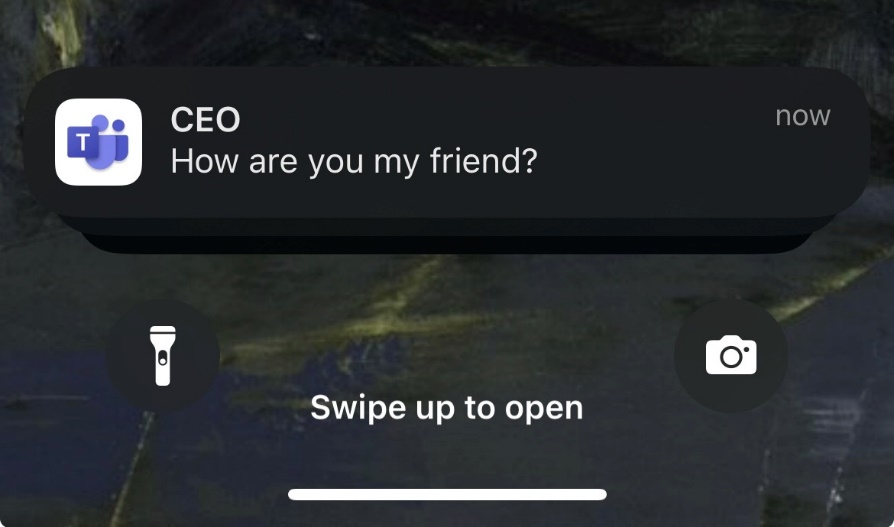
Whether on a phone app or a PC, these alerts draw our immediate attention, especially when they signal messages from key figures within an organization. For instance, receiving a notification that implies a message is from the CEO or another high-ranking official inherently demands a higher level of urgency and importance. This psychological effect is what makes notifications not just informative but influential.
Within each message sent, there’s a parameter called imdisplayname, which, by default, displays the sender’s name:

Through our investigation, we’ve found that this parameter can be altered to any desired value. This manipulation results in the recipient receiving a notification that appears to come from someone other than the actual sender:

Result:
Altering Display Names in Private Chats
Microsoft Teams provides functionality to update the conversation topic in group chats through a specific PUT endpoint. This feature is designed to help users organize and identify their chats more efficiently.
PUT /api/chatsvc/emea/v1/threads/<Conversation ID>/properties?name=topic
By manipulating the request to this endpoint, it’s possible to alter the conversation topic not just in group chats, where such changes are expected and allowed, but surprisingly, in private conversations as well.
In case of private chat—a direct conversation between two individuals—any change to the topic should ideally be restricted or not applicable, given the nature of private chats not having a ‘topic’ in the conventional sense.
Before:

After:

Such a change, when executed, can mislead users into believing they are engaging in a conversation with a different person.
Forging Caller Identity in Video/Audio Calls
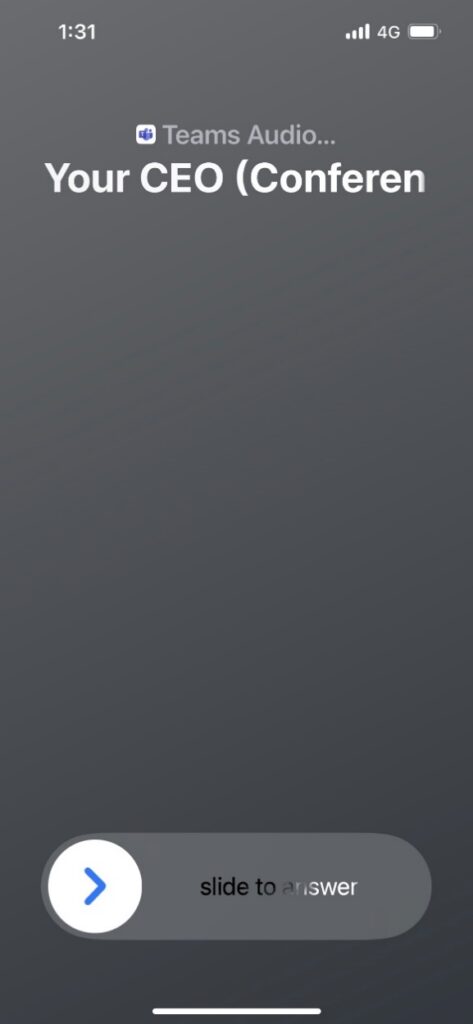
We discovered that the display name used in call notifications could be arbitrarily modified through specific manipulations of call initiation requests. This flaw allows an attacker to forge the caller identity, presenting any chosen name to the call recipient.
During the call initiation phase, a JSON payload is sent to:
POST /api/v2/epconv
containing various parameters that define the call’s characteristics. Among these, the “displayName” parameter within the “participants” section is of particular interest. This parameter is intended to display the name of the caller as it appears to the recipient.
By modifying the “displayName” value in the payload, we were able to alter the apparent identity of the caller. For instance, changing it to an arbitrary name results in the call recipient seeing a call incoming from the modified name, instead of the actual caller’s identity:

This results in:
Real-World Attack Scenarios
These vulnerabilities create several concerning attack scenarios that align with techniques used by sophisticated threat actors, including nation-state groups:
Executive Impersonation and Social Engineering
Attackers can significantly impersonate others, making it appear as though a message was sent by someone else. In private chats, a malicious guest user could impersonate someone internal, such as a finance department member. Notifications can be spoofed to display a false sender name, preying on the instinct to trust official-looking notifications, potentially from authority figures or top executives.
Advanced Persistent Threats and Data Exfiltration
These attacks can directly facilitate more severe malicious activities commonly seen in nation-state campaigns:
Malware Delivery: Attackers can send a spoofed notification, seemingly from a trusted source like a top executive, asking for urgent action or clicking a link, which then installs malware.
Credential Harvesting / Fraud: By impersonating someone internal, particularly in finance, attackers could fish for sensitive data or commit fraud by pretending to discuss budget numbers or other sensitive information.
Misinformation Campaigns: The ability to create false message histories and undermine trust in conversation integrity enables the spread of misinformation campaigns.
Privacy Breaches: The overall vulnerability impact includes privacy breaches.
Briefing Disruption: The ability to impersonate individuals during sensitive briefings hosted on Teams can spread confusion or trick participants into revealing sensitive information. This implies a broad risk for any role involved in high-stakes communications.
Risk Mitigation Strategies
How Organizations Can Reduce Their Risk
Microsoft has since addressed the vulnerabilities we reported in Teams, requiring no action from users. However, collaboration platforms provide only a baseline of native security, and our research shows that this layer can be bypassed.
To protect against trust exploitation, organizations need an additional layer of defense that includes:
- Zero Trust Access Controls – verifying user identity and device posture continuously, not just at login.
- Advanced Threat Prevention – inspecting files, links, and payloads shared inside collaboration apps.
- Data Loss Prevention (DLP) – enforcing granular policies to prevent unauthorized data exfiltration.
- User Awareness and Verification Protocols – training employees to question high-risk requests and use out-of-band validation for sensitive actions.
Protecting the modern workplace requires security that extends beyond what collaboration platforms natively deliver. Only with a second, multi-layered defense can organizations safeguard the communications, data, and trust that keep business running.
Join our webinar to dive deeper into the findings and practical defenses:
https://pages.checkpoint.com/2025-nov-ww-critical-microsoft-teams-vulnerabilities-uncovered.html
How Organizations Can Reduce Their Risk
Microsoft has since addressed the vulnerabilities we reported in Teams.
However, the vulnerabilities we discovered emphasize the importance of behavioral practices for reducing exposure:
Critical Thinking: Our research highlights the constant need for critical thinking now more than ever. Users should always question what they see and hear online, even when it seems to come from a source they normally trust.
Digital Awareness: Understanding these specific attack vectors is a vital to becoming more digitally aware. Organizations should educate their teams about these particular manipulation techniques.
Verification Protocols: Given the ease with which these vulnerabilities can be exploited, organizations should implement out-of-band verification methods for sensitive communications, especially those involving financial transactions or sensitive data.
Disclosure Timeline
- 23 March 2024 – Vulnerabilities were disclosed to Microsoft.
- 25 March 2024 – Microsoft acknowledged the disclosure and confirmed it would investigate the reported issues.
- 18 April 2024 – Microsoft confirmed the reported behavior and stated that they would continue their investigation to determine the appropriate resolution.
- 8 May 2024 – The “Edit Messages Without Trace” issue was fixed.
- 31 July 2024 – The “Altering Display Names in Private Chats” was fixed.
- 13 August 2024 – Planned release date for the fix addressing the “Manipulating Notifications” issue, tracked as CVE-2024-38197.
- 13 September 2024 – The “Manipulating Notifications” issue was fixed.
- October 2025 – The “Caller Identity in Vide/Audio Calls” issue was fixed
如有侵权请联系:admin#unsafe.sh