Telerik developers recently changed Fiddler to validate the signature on extension assemblies before they load. If the assembly is unsigned, the user is presented with the following message:

In theory, this seems fine/good– signing files is a good thing!
However, it’s important to understand the threat model and tradeoffs here.
Validating signatures every time a file is loaded takes time and slows the startup of the app. That’s particularly true if online certificate revocation checking is performed. The performance impact is one reason why most of my applications have a manifest that indicates that .NET shouldn’t bother:
<configuration>
  <runtime>
	<generatePublisherEvidence enabled="false"/>
  </runtime>
</configuration>
Signing your installers is critical to help protect them at rest on your servers and streamline the security checks that happen on download and install. Signing the binaries within can be useful in case the user has Smart App Control enabled, and other security software (e.g. Firewall rules that target publisher signatures) may benefit as well.
However, having your app check the signature itself is less useful than you might expect for most applications. The problem is that there’s usually no trust boundary that would preclude an attacker from tampering with your app’s code to remove the signature check. In most cases, the attacker could simply modify fiddler.exe to remove the new signature checking code, such that the protection is removed. Similarly, they could likely execute a .DLL hijacking attack to get their code loaded without any signature check at all.
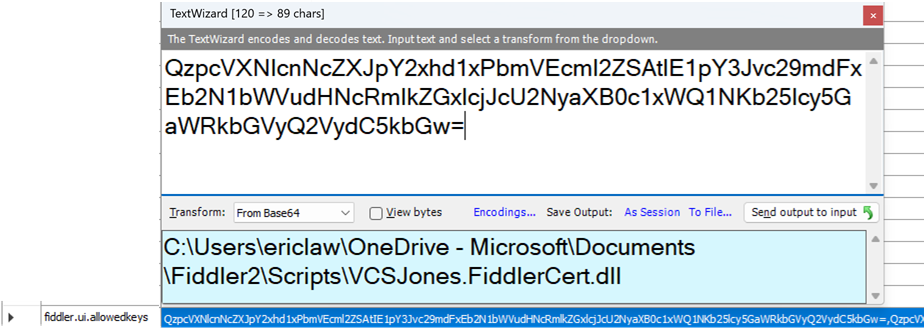
In Telerik’s case, the tampering problem is even worse. If the user elects to “Always allow” an unsigned extension, that decision is stored as a base64 encoded string in a simple Fiddler preference:

An attacker with sufficient permission to write a .DLL to a place that Fiddler will load it would also have sufficient permission to edit the registry keys where this preference is stored.
Finally, Fiddler’s signature check doesn’t tell the user who signed the file, such that all signatures that chain to any CA are silently allowed. Now, this isn’t entirely worthless– CAs cannot prevent a certificate from being used to sign malware, but in theory a certificate found to do so will eventually get revoked.
If you plan to check code signatures in your application, carefully consider the threat model and ensure that you understand the limits to the protection.
-Eric
Impatient optimist. Dad. Author/speaker. Created Fiddler & SlickRun. PM @ Microsoft 2001-2012, and 2018-, working on Office, IE, and Edge. Now working on Microsoft Defender. My words are my own, I do not speak for any other entity. View more posts